gdk_pixbuf_new_from_data读取读取未压缩的RGB数据并返回GdkPixbuf指针
原型:
GdkPixbuf *gdk_pixbuf_new_from_data(const guchar *data,

    GdkColorspace colorspace, gboolean has_alpha,

    int bits_per_sample, int width, int height, int rowstride,

    GdkPixbufDestroyNotify destroy_fn,

    gpointer destroy_fn_data);
data 指向图像数据区。这个数据区应该应该是按照从上到下、从左到右排列的像素点数据(不包含图像文件的头),并且每个象素点按照 RGB 的顺序排列(如果不是这样,需要首先调整好这些图像数据)。
colorspace 是固定的,为 GDK_COLORSPACE_RGB。
has_alpha 图像无 alpha 通道的话,可以代入 FALSE。
bits_per_sample 是固定的,为 8。
width, height 是图像的实际大小。
rowstride步长,个人理解就是图像宽度x通道数
You must calculate and pass in a rational row stride for the pixel buffer you've created. The pixel buffer is really only a one-dimensional array of guchar elements, so gdk-pixbuf can't guess from the height and width parameters what your intended row stride should be. In the case of gdk_pixbuf_new( ), gdk-pixbuf creates its own pixel buffer and can make its own decision about the row stride.
You should use this function only if you know what you're doing. Gdk-pixbuf does very little safety checking on the imported buffer, so if your rowstride value doesn't properly match the rows of pixels in your buffer, your image will end up scrambled. Gdk-pixbuf unquestioningly accepts your values, trusting you not to make any mistakes.
Sometimes you end up with a three-channel RGB pixel buffer that you later need to convert into a four-channel RGBA buffer. The most common example of such a situation occurs when you load a three-channel image from a file but need to use the alpha channel for masking. The file-loading modules create whichever style of GdkPixbuf best matches the image file. You can't tell it ahead of time that you need four-channel pixel buffers, so you're forced to convert it to RGBA after the fact.
Although it may seem simple at first to tack the extra channel onto each pixel, you'll find that things are a little more complicated if you try this by hand. First you have to create a new GdkPixbuf and copy the pixels into it one by one, adding the extra alpha channel byte to each one as you go. An added twist is the fact that your row stride will always change, so the number of unused padding bytes at the end of each row will change as well. You can't just do a simple byte-by-byte transfer.
Recall our row stride example from Section 10.3.1, in which an image with a width of 25 pixels had a row stride of 76 (25 3 = 75), which amounts to a single byte of padding per row. Adding an alpha channel to this image will result in a row stride of 100 (25 4), which means that the new buffer will have no padding bytes. Every time you copy over a row of pixels, you will have to drop a byte.
例子:
#include <gtk/gtk.h>


#define WIDTH 300

#define HEIGHT 300


GtkWidget *window;

GdkPixbuf *pixbuf;

GtkWidget *image;


int main() {


    gtk_init(NULL, NULL);

    window = gtk_window_new(GTK_WINDOW_TOPLEVEL);

    gtk_window_set_default_size(GTK_WINDOW(window), WIDTH, HEIGHT);

    gtk_window_set_title(GTK_WINDOW(window), "RgbaShow");


    guchar rgbbuf[WIDTH *HEIGHT * 4];

    guchar *pos;

    pos = rgbbuf;

    for (int y = 0; y < HEIGHT; y++)

    {

        for (int x = 0; x < WIDTH; x++)

        {

            *pos++ = x<WIDTH/2?100:200;         /* Red. */

            *pos++ = y<HEIGHT/2?200:150;        /* Green. */

            *pos++ = 207;                       /* Blue. */

            *pos++ = 107;                       /* alpha. */

        }

    }


    pixbuf = gdk_pixbuf_new_from_data(rgbbuf, GDK_COLORSPACE_RGB, TRUE, 8, WIDTH, HEIGHT, WIDTH*4, NULL, NULL);

    image = gtk_image_new_from_pixbuf(pixbuf);

    gtk_container_add(GTK_CONTAINER(window),image);

    gtk_widget_show_all(window);

    g_signal_connect(G_OBJECT(window),"destroy",G_CALLBACK(gtk_main_quit),NULL);

    gtk_main();

}
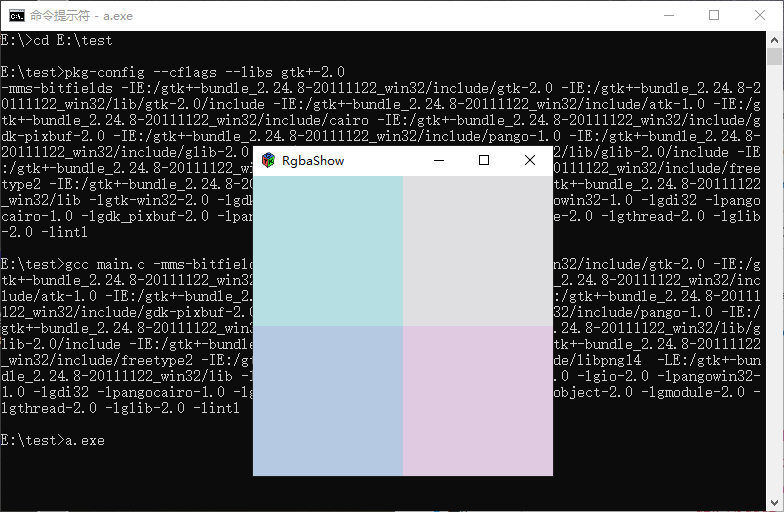
效果