fork炸弹是什么?
fork炸弹以极快的速度创建大量进程(进程数呈以2为底数的指数增长趋势),并以此消耗系统分配予进程的可用空间使进程表饱和,而系统在进程表饱和后就无法运行新程序,除非进程表中的某一进程终止;但由于fork炸弹程序所创建的所有实例都会不断探测空缺的进程槽并尝试取用以创建新进程,因而即使在某进程终止后也基本不可能运行新进程。fork炸弹生成的子程序在消耗进程表空间的同时也会占用CPU和内存,从而导致系统与现有进程运行速度放缓,响应时间也会随之大幅增加,以致于无法正常完成任务,从而使系统的正常运作受到严重影响。
fork炸弹本体就是下面一串简单的shell脚本代码
由于shell函数可以省略function前缀,因此也可以写成更精炼的模式
当linux系统运行此脚本后,立刻卡死,只有重启才能够解决,而且这种脚本的运行不需要任何特殊权限,以普通用户的身份就可以运行,因此非常危险
如何预防fork炸弹?
使用ulimt命令可以预防fork炸弹,通过ulimit限制用户最大进程数,可以避免fork炸弹无限制创建进程
设置用户最大进程数100
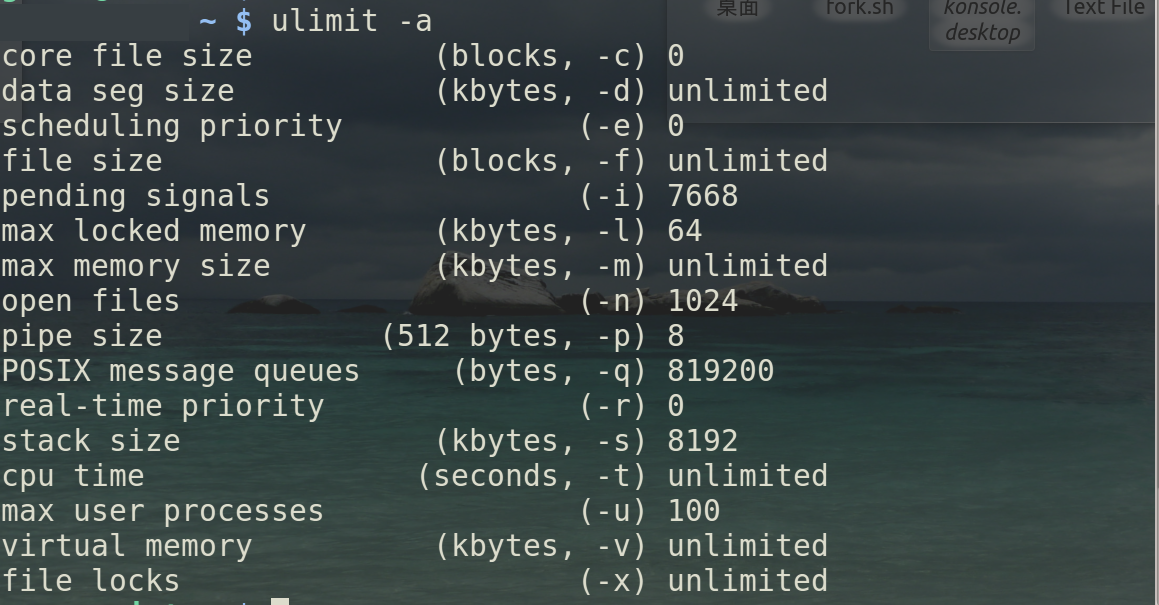
查看用户资源
max user process 已经变成了100,此时运行fork炸弹脚本已经不行了
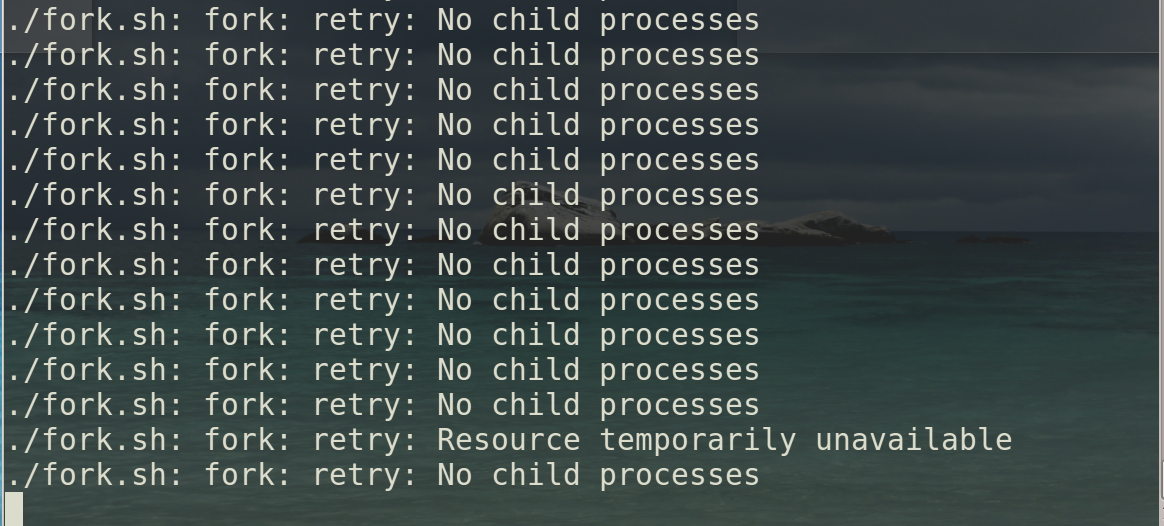
此时再去运行fork脚本,会出现没有子进程的提示。明显创建的进程已经达到了上限。就无法执行了
但是这种方法只针对当前终端有效,更彻底的办法,需要修改/etc/security/limits.conf这个文件
/etc/security/limits.conf
# /etc/security/limits.conf

#

#Each line describes a limit for a user in the form:

#

#<domain>        <type>  <item>  <value>

#

#Where:

#<domain> can be:

#        - an user name

#        - a group name, with @group syntax

#        - the wildcard *, for default entry

#        - the wildcard %, can be also used with %group syntax,

#                 for maxlogin limit

#        - NOTE: group and wildcard limits are not applied to root.

#          To apply a limit to the root user, <domain> must be

#          the literal username root.

#

#<type> can have the two values:

#        - "soft" for enforcing the soft limits

#        - "hard" for enforcing hard limits

#

#<item> can be one of the following:

#        - core - limits the core file size (KB)

#        - data - max data size (KB)

#        - fsize - maximum filesize (KB)

#        - memlock - max locked-in-memory address space (KB)

#        - nofile - max number of open files

#        - rss - max resident set size (KB)

#        - stack - max stack size (KB)

#        - cpu - max CPU time (MIN)

#        - nproc - max number of processes

#        - as - address space limit (KB)

#        - maxlogins - max number of logins for this user

#        - maxsyslogins - max number of logins on the system

#        - priority - the priority to run user process with

#        - locks - max number of file locks the user can hold

#        - sigpending - max number of pending signals

#        - msgqueue - max memory used by POSIX message queues (bytes)

#        - nice - max nice priority allowed to raise to values: [-20, 19]

#        - rtprio - max realtime priority

#        - chroot - change root to directory (Debian-specific)

#

#<domain>      <type>  <item>         <value>

#


#*               soft    core            0

#root            hard    core            100000

#*               hard    rss             10000

#@student        hard    nproc           20

#@faculty        soft    nproc           20

#@faculty        hard    nproc           50

#ftp             hard    nproc           0

#ftp             -       chroot          /ftp

#@student        -       maxlogins       4


# End of file
在后面追加资源限制,格式是
<domain> <type> <item> <value>
限制用户aaa的最大进程数200
aaa hard nproc 200
保存退出即可,用户aaa运行fork炸弹就不会对系统造成影响了