使用vmplayer虚拟机在运行linux的时候发现没有合适的分辨率,不能够全屏运行看起来难受
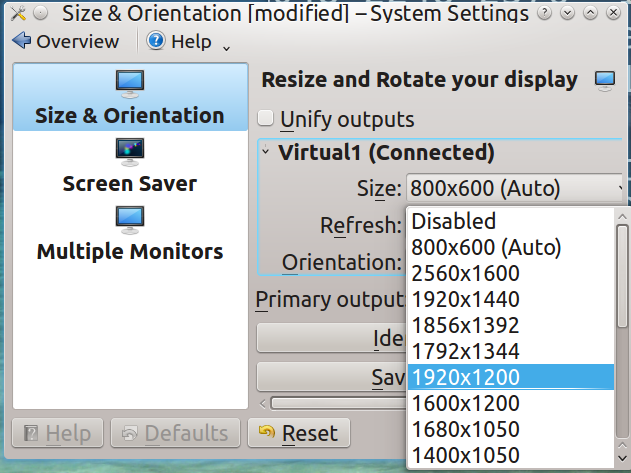
查看当前显示信息
g@mint ~ $ xrandr

Screen 0: minimum 1 x 1, current 800 x 600, maximum 8192 x 8192

Virtual1 connected 800x600+0+0 (normal left inverted right x axis y axis) 0mm x 0mm

   800x600        60.0*+   60.3

   2560x1600      60.0

   1920x1440      60.0

   1856x1392      60.0

   1792x1344      60.0

   1920x1200      59.9

   1600x1200      60.0

   1680x1050      60.0

   1400x1050      60.0

   1280x1024      60.0

   1440x900       59.9

   1280x960       60.0

   1360x768       60.0

   1280x800       59.8

   1152x864       75.0

   1280x768       59.9

   1024x768       60.0

   640x480        59.9

Virtual2 disconnected (normal left inverted right x axis y axis)

Virtual3 disconnected (normal left inverted right x axis y axis)

Virtual4 disconnected (normal lefx axis y axis)

Virtual5 disconnected (normal lefx axis y axis)

Virtual6 disconnected (normal lefx axis y axis)

Virtual7 disconnected (normal lefx axis y axis)

Virtual8 disconnected (normal lefx axis y axis)
电脑分辨率是1920x1080的,通过命令手动来设置分辨率
输入以下命令
cvt 1920 1080

输入以下命令。后面就是cvt命令输出的Modeline后面的部分
xrandr --newmode "1920x1080_60.00" 173.00 1920 2048 2248 2576 1080 1083 1088 1120 -hsync +vsync
输入
xrandr --addmode Virtual1 "1920x1080_60.00"

xrandr -s 1920x1080_60.00
就可以更改系统分辨率了
上面的命令只在当前开机时有效,在系统重启后分辨率又重新恢复默认了,如何让系统伴随用户登录自动设置分辨率?
~/.profile文件是随着用户启动自动执行的文件,我们只需要把4条命令追加到其中就好了
vi ~/.profile
追加以下内容:
cvt 1920 1080

xrandr --newmode "1920x1080_60.00" 173.00 1920 2048 2248 2576 1080 1083 1088 1120 -hsync +vsync

xrandr --addmode Virtual1 "1920x1080_60.00"

xrandr -s 1920x1080_60.00