ZBar is an open source software suite for reading bar codes from various sources, such as video streams, image files and raw intensity sensors. It supports many popular symbologies (types of bar codes) including EAN-13/UPC-A, UPC-E, EAN-8, Code 128, Code 39, Interleaved 2 of 5 and QR Code.
The flexible, layered implementation facilitates bar code scanning and decoding for any application: use it stand-alone with the included GUI and command line programs, easily integrate a bar code scanning widget into your Qt, GTK+ or PyGTK GUI application, leverage one of the script or programming interfaces (Python, Perl, C++) ...all the way down to a streamlined C library suitable for embedded use.
ZBar is licensed under the GNU LGPL 2.1 to enable development of both open source and commercial projects.
How does it work?
A common design for a bar code "image scanner" is to apply digital image processing techniques to an image containing a bar code: exact details vary, but this usually involves several filter steps to cleanup noise, sharpen and enhance contrast, edge detection and shape analysis to determine symbol location and orientation, etc. Finally the data is extracted from this pristine image. All of these processing stages require CPU cycle and memory resources and are often sensitive to various "filter parameter" configurations which are difficult for end-users to understand and setup.
The ZBar library uses an approach closer to that used by "wand" and "laser" scanners: linear (1D) bar codes are designed to be decoded by a simple light sensor passing over the light and dark areas of a symbol. Taking advantage of this, the ZBar implementation makes linear scan passes over an image, treating each pixel as a sample from a single light sensor. The data is scanned, decoded and assembled on the fly.
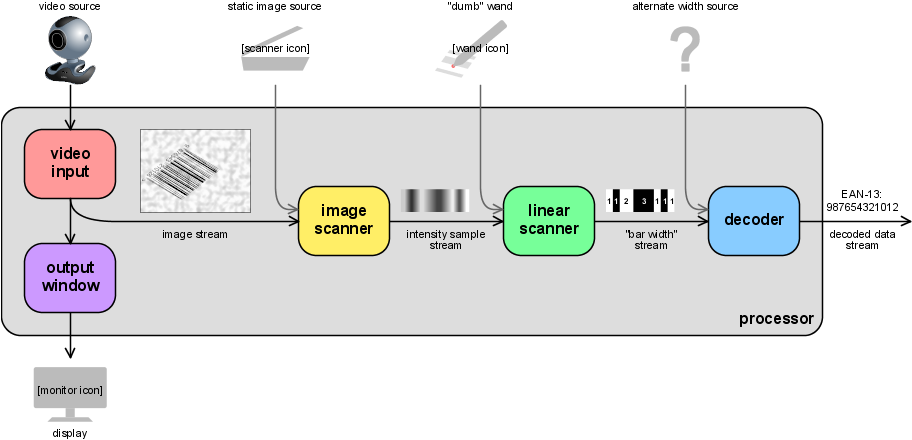
Taking a cue from modern processing paradigms, ZBar further abstracts this idea into a layered streaming model. Processing is separated into independent layers with well defined interfaces, which can be used together or individually plugged into any other system. A high-level description of the modules is provided here:
1.下载zbar
https://zbar.sourceforge.net/about.html
下载windows安装版并且安装
2.下载opencv库并安装
demo.cpp
#include <opencv2/opencv.hpp>

#include <zbar.h>

#include <iostream>

using namespace std;

using namespace cv;

using namespace zbar;


int main(){

    ImageScanner scanner;

    scanner.set_config(ZBAR_NONE,ZBAR_CFG_ENABLE,1);

    //读取图片

    Mat src = imread("1.jpg",IMREAD_COLOR);

    Mat imageGray;

    //转换为灰度图像

    cvtColor(src,imageGray,CV_RGB2GRAY);

    //获取图像长宽

    int width = imageGray.cols;

    int height = imageGray.rows;

    unsigned char *raw = (unsigned char*)imageGray.data;

    //Y800=GREY 是GRAY灰度图像

    Image imageZbar(width,height,"Y800",raw,width*height);

    //扫描图像

    scanner.scan(imageZbar);

    //建立迭代器

    Image::SymbolIterator symbol = imageZbar.symbol_begin();

    if(imageZbar.symbol_begin() ==  imageZbar.symbol_end()){

        cout<<"查询条码失败,请检查图片!"<<endl;

    }

    //通过迭代器遍历扫描到的所有条码

    for(;symbol != imageZbar.symbol_end();++symbol){

        cout<<"type:"<<symbol->get_type_name()<<endl;

        cout<<"code:"<<symbol->get_data()<<endl;

    }

    //显示图像

    imshow("source image",src);

    waitKey();

    imageZbar.set_data(NULL,0);

    //释放opencv窗体资源

    destroyAllWindows();

    return 0;

}
编译链接,链接到opencv和zbar的c++库
g++ demo.cpp -ID:\libs\opencv\include -LD:\libs\opencv\x86\mingw\lib -lopencv_calib3d2412.dll -lopencv_contrib2412.dll -lopencv_core2412.dll -lopencv_features2d2412.dll -lopencv_flann2412.dll -lopencv_gpu2412.dll -lopencv_highgui2412.dll -lopencv_imgproc2412.dll -lopencv_legacy2412.dll -lopencv_ml2412.dll -lopencv_nonfree2412.dll -lopencv_objdetect2412.dll -lopencv_ocl2412.dll -lopencv_photo2412.dll -lopencv_stitching2412.dll -lopencv_superres2412.dll -lopencv_ts2412 -lopencv_video2412.dll -lopencv_videostab2412.dll -ID:\libs\ZBar\include -LD:\libs\ZBar\lib -lzbar.dll
另外自带的使用ImageMagick库识别二维码的例子
#include <iostream>

#include <Magick++.h>

#include <zbar.h>

#define STR(s) #s


using namespace std;

using namespace zbar;


int main (int argc, char **argv)

{

    if(argc < 2) return(1);


#ifdef MAGICK_HOME

    // http://www.imagemagick.org/Magick++/

    //    under Windows it is necessary to initialize the ImageMagick

    //    library prior to using the Magick++ library

    Magick::InitializeMagick(MAGICK_HOME);

#endif


    // create a reader

    ImageScanner scanner;


    // configure the reader

    scanner.set_config(ZBAR_NONE, ZBAR_CFG_ENABLE, 1);


    // obtain image data

    Magick::Image magick(argv[1]);  // read an image file

    int width = magick.columns();   // extract dimensions

    int height = magick.rows();

    Magick::Blob blob;              // extract the raw data

    magick.modifyImage();

    magick.write(&blob, "GRAY", 8);

    const void *raw = blob.data();


    // wrap image data

    Image image(width, height, "Y800", raw, width * height);


    // scan the image for barcodes

    int n = scanner.scan(image);


    // extract results

    for(Image::SymbolIterator symbol = image.symbol_begin();

        symbol != image.symbol_end();

        ++symbol) {

        // do something useful with results

        cout << "decoded " << symbol->get_type_name()

             << " symbol \"" << symbol->get_data() << '"' << endl;

    }


    // clean up

    image.set_data(NULL, 0);


    return(0);

}
个人使用ImageMagicK库时感觉效率比较低并且会出现问题,不如使用成熟的opencv库更简单。