calltree
test.c
/* file: test.c */

#include <stdio.h>


void func_5(void){

    printf("hello!\n");

}


void func_4(void){

    func_5();

}


void func_3(void){

    func_4();

}


void func_2(void){

    func_3();

}


void func_1(void){

    func_2();

}


int main()

{

    func_1();

    func_4();


    return 0;

}
解压
tar -jxvf calltree-2.3.tar.bz2

cd calltree-2.3
如果系统是x86架构,则需要进行以下规则的配置
cp RULES/i686-linux-cc.rul RULES/x86_64-linux-cc.rul
由于项目中的configure已经弃用,推荐直接使用make,但是make之前先配置项目中函数名与gcc函数名冲突问题
find . -name "*.[c|h]" |xargs sed -i -e "s/fexecve/fexecve_calltree/"

find . -name "*.[c|h]" |xargs sed -i -e "s/getline/getline_calltree/"

make
这里系统是x86架构,所以拷贝的是x86_64-linux-cc目录下的程序(或建立链接文件也可以)
sudo cp calltree/OBJ/x86_64-linux-cc/calltree /usr/bin/calltree
安装graphviz
sudo apt-get install graphviz
通过calltree --help命令查看使用帮助信息,主要有以下几个常用选项:
-b:在每个制表位处打印垂直条;

-g:输出函数所在文件的目录;

-m:只分析main函数调用关系;

-p:使用c预处理(默认),缺点就是容易产生多余的信息;

-np:不使用c预处理;

-xvcg:导出供xvcg使用的格式;

-dot:导出供graphviz使用的格式;

depth=#:设置最大打印深度;

list=name:仅为函数name生成调用图;

listfile=file:只列出在file中找到的函数;

igorefile=file:不列出在file中找到的函数。
test.c生成图像
calltree -np -g -b depth=10 list=main test.c -dot > test.dot

dot -T png test.dot -o test.png
结果

cflow
osx.c
/*

 *      osx.c - this file is part of Geany, a fast and lightweight IDE

 *

 *      Copyright 2015 Jiri Techet <techet(at)gmail(dot)com>

 *

 *      This program is free software; you can redistribute it and/or modify

 *      it under the terms of the GNU General Public License as published by

 *      the Free Software Foundation; either version 2 of the License, or

 *      (at your option) any later version.

 *

 *      This program is distributed in the hope that it will be useful,

 *      but WITHOUT ANY WARRANTY; without even the implied warranty of

 *      MERCHANTABILITY or FITNESS FOR A PARTICULAR PURPOSE.  See the

 *      GNU General Public License for more details.

 *

 *      You should have received a copy of the GNU General Public License along

 *      with this program; if not, write to the Free Software Foundation, Inc.,

 *      51 Franklin Street, Fifth Floor, Boston, MA 02110-1301 USA.

 */


#ifdef MAC_INTEGRATION


#include "osx.h"


#include "utils.h"

#include "ui_utils.h"

#include "main.h"


static gboolean app_block_termination_cb(GtkosxApplication *app, gpointer data)

{

    return !main_quit();

}


/* For some reason osx doesn't like when the NSApplicationOpenFile handler blocks for

 * a long time which may be caused by the project_ask_close() below. Finish the

 * NSApplicationOpenFile handler immediately and perform the potentially blocking

 * code on idle in this function. */

static gboolean open_project_idle(gchar *locale_path)

{

    gchar *utf8_path;


    utf8_path = utils_get_utf8_from_locale(locale_path);

    if (app->project == NULL ||

        (g_strcmp0(utf8_path, app->project->file_name) != 0 && project_ask_close()))

        project_load_file_with_session(locale_path);

    g_free(utf8_path);

    g_free(locale_path);

    return FALSE;

}


static gboolean app_open_file_cb(GtkosxApplication *osx_app, gchar *path, gpointer user_data)

{

    gchar opened = FALSE;

    gchar *locale_path;


    locale_path = utils_get_locale_from_utf8(path);


    if (!g_path_is_absolute(locale_path))

    {

        gchar *cwd = g_get_current_dir();

        SETPTR(locale_path, g_build_filename(cwd, locale_path, NULL));

        g_free(cwd);

    }


    if (g_str_has_suffix(path, ".geany"))

    {

        g_idle_add((GSourceFunc)open_project_idle, locale_path);

        opened = TRUE;

    }

    else

    {

        opened = document_open_file(locale_path, FALSE, NULL, NULL) != NULL;

        g_free(locale_path);

    }


    return opened;

}


static void on_new_window(GtkMenuItem *menuitem, G_GNUC_UNUSED gpointer user_data)

{

    utils_start_new_geany_instance(NULL);

}


void osx_ui_init(void)

{

    GtkWidget *item, *menu;

    GtkosxApplication *osx_app = gtkosx_application_get();


    item = ui_lookup_widget(main_widgets.window, "menubar1");

    gtk_widget_hide(item);

    gtkosx_application_set_menu_bar(osx_app, GTK_MENU_SHELL(item));


    item = ui_lookup_widget(main_widgets.window, "menu_quit1");

    gtk_widget_hide(item);


    item = ui_lookup_widget(main_widgets.window, "menu_info1");

    gtkosx_application_insert_app_menu_item(osx_app, item, 0);


    item = ui_lookup_widget(main_widgets.window, "menu_help1");

    gtkosx_application_set_help_menu(osx_app, GTK_MENU_ITEM(item));


    gtkosx_application_set_use_quartz_accelerators(osx_app, FALSE);


    g_signal_connect(osx_app, "NSApplicationBlockTermination",

                    G_CALLBACK(app_block_termination_cb), NULL);

    g_signal_connect(osx_app, "NSApplicationOpenFile",

                    G_CALLBACK(app_open_file_cb), NULL);


    menu = gtk_menu_new();

    item = gtk_menu_item_new_with_label("New Window");

    g_signal_connect(G_OBJECT(item), "activate", G_CALLBACK(on_new_window), NULL);

    gtk_menu_shell_append(GTK_MENU_SHELL(menu), item);

    gtkosx_application_set_dock_menu(osx_app, GTK_MENU_SHELL(menu));

}


#endif /* MAC_INTEGRATION */
安装cflow和graphviz
sudo apt-get install cflow graphviz
将以下脚本保存为tree2dotx
#!/bin/bash

# tree2dot.sh --- transfer a "tree"(such as the result of tree,calltree)

#                 to a p_w_picpath discribed by DOT language(provided by Graphviz)

# author: falcon<zhangjinw@gmail.com>

# update: 2007-11-14

# usage:

#       tree -L 2 -d /path/to/a/directory | bash tree2dot.sh > tree.dot

#       cd /path/to/a/c/project/; calltree -gb -np -m *.c | bash tree2dot.sh > tree.dot


# indicate the symbols you not concern with space as decollator here

filterstr="";


# transfer the tree result to a file described in DOT language

grep -v ^$ | grep -v "^[0-9]* director" \

| awk '{if(NR==1) system("basename "$0); else printf("%s\n", $0);}' |\

awk -v fstr="$filterstr" '# function for filter the symbols you not concern

        function need_filter(node) {

                for( i in farr ) {

                if(match(node,farr[i]" ") == 1 || match(node,"^"farr[i]"$") == 1) {

                        return 1;

                }

                }

                return 0;

        }

        BEGIN{ # filternode array are used to record the symbols who have been filtered.

                oldnodedepth=-1; oldnode=""; nodep[-1]=""; filternode[nodep[-1]]=0;

                # store the symbols to an array farr

                split(fstr,farr," ");

                # print some setting info

                printf("digraph G{\n");

                printf("\trankdir=LR;\n");

                printf("\tsize=\"800,600\";\n");

                printf("\tnode [fontsize=10,fontcolor=red,style=filled,fillcolor=lightblue];\n");

        }{

                # get the node, and its depth(nodedepth)

                nodedepth=match($0, "[^| `]");

                node=substr($0,nodedepth);

                nodedepth=int(nodedepth/4)

                # if whose depth is 1 less than him, who is his parent

                if(nodedepth-oldnodedepth == 1) {

                        nodep[nodedepth-1]=oldnode;

                }

                # for debugging

                #printf("%d %s\n", nodedepth, node);

                #printf("\t\"%s\";\n",node);

                # print the vectors

                if (oldnodedepth != -1) {

                        # if need filter or whose parent have been filter, not print it, and set the flat of filter to 1

                        if(need_filter(node) || filternode[nodep[nodedepth-1]]==1) {

                                filter[node]=1;

            } else if (nodep[nodedepth-1] != "") {

                                printf("\t\"%s\" -> \"%s\";\n", nodep[nodedepth-1], node, nodep[nodedepth-1], node);

                        #       printf("\t\"%s\" -> \"%s\"[label=\"%s>%s\"];\n", nodep[nodedepth-1], node, nodep[nodedepth-1], node);

                        }

                }

                # save the old depth and the old node

                oldnodedepth=nodedepth;

                oldnode=node;

        }END{

                printf("}");

        }'
添加执行权限,放入/usr/bin目录
chmod +x tree2dotx

sudo cp tree2dotx /usr/bin
安装gawk
sudo apt-get install gawk
生成图片
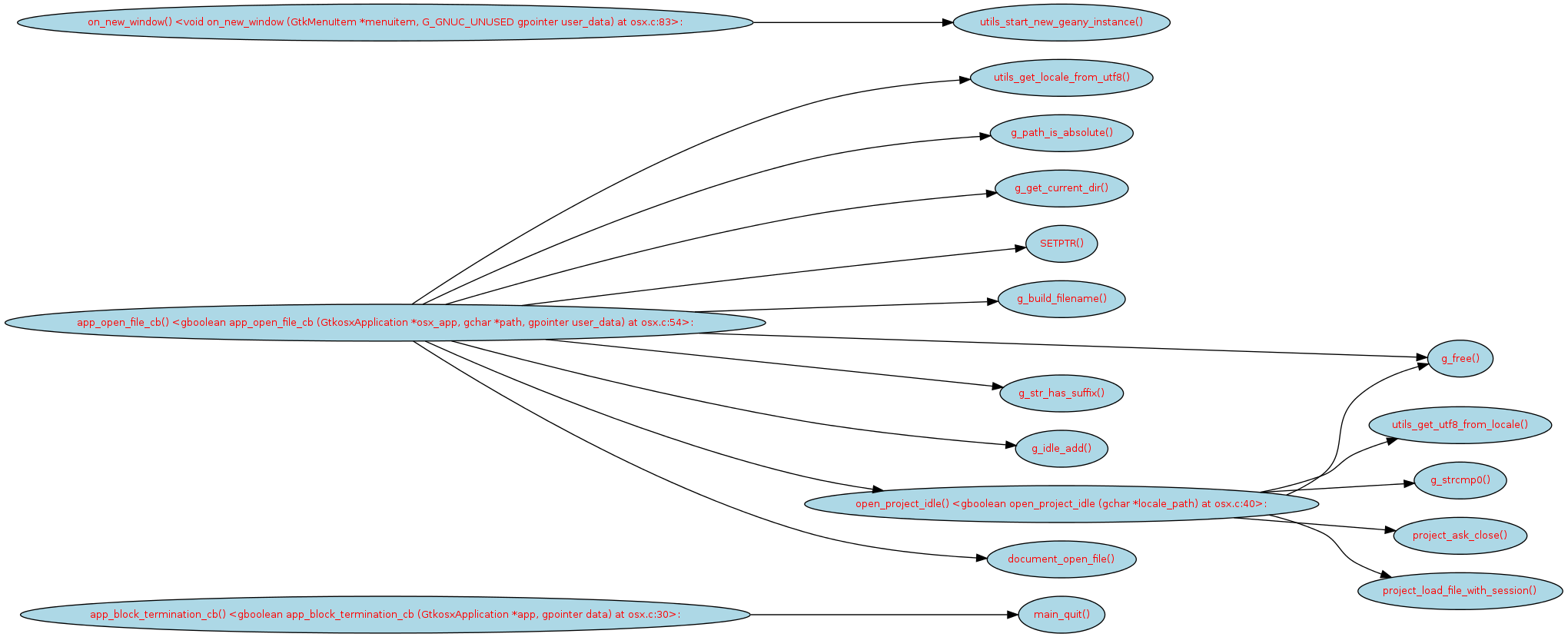
cflow osx.c | tree2dotx  > out.dot

dot -T png out.dot -o out.png
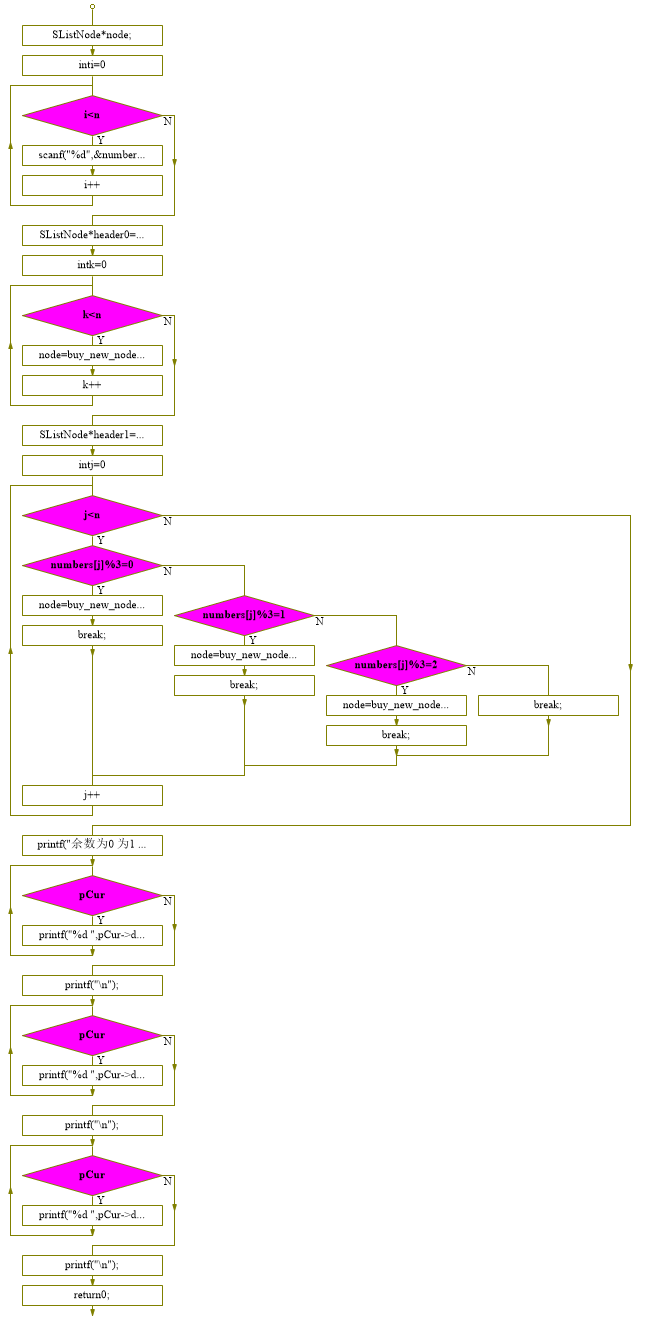
流程图分析工具AutoFlowchart
#include <stdio.h>

#include <assert.h>

//链表结构体

struct SListNode{

    int data;//数据

    struct SListNode *pNext;//下个节点

};

//建立新节点

SListNode* buy_new_node(int data){

    SListNode* newNode = (SListNode*)malloc(sizeof(SListNode));//分配内存空间

    assert(newNode);

    newNode->data = data;//设置数据

    newNode->pNext = NULL;//下一个节点为空

    return newNode;//返回节点

}

//插入新数据

void pushback_node(SListNode *header,SListNode *node){

    assert(header);

    SListNode *pCur = header;//头指针

    while(pCur->pNext){//找到尾部

        pCur = pCur->pNext;

    }

    pCur->pNext = node;//插入数据

}

//数量统计

int get_number_of_list(SListNode *header){

    assert(header);

    int iCount = 0;

    SListNode *pCur = header;

    while(pCur->pNext){//遍历链表

        pCur = pCur->pNext;

        iCount++;//增加计数

    }

    return iCount;

}

int main(){

    SListNode *node;

    int numbers[50] = {0};

    int n;

    puts("输入数字N");

    scanf("%d",&n);//获取数字总数

    puts("依次输入数字");

    for(int i=0;i<n;i++){

        scanf("%d",&numbers[i]);//将数字存入数组

    }

    SListNode *header0 = buy_new_node(0);//链表

    for(int k=0;k<n;k++){

            node = buy_new_node(numbers[k]);

            pushback_node(header0,node);//将数据插入链表

    }

    SListNode * header1 = buy_new_node(0);//余数为0的子链表

    SListNode * header2 = buy_new_node(0);//余数为1的子链表

    SListNode * header3 = buy_new_node(0);//余数为2的子链表


    for(int j=0;j<n;j++){

        switch(numbers[j]%3){

        case 0:

            node = buy_new_node(numbers[j]);

            pushback_node(header1,node);//将余数为0的数据插入子链表

            break;

        case 1:

            node = buy_new_node(numbers[j]);

            pushback_node(header2,node);//将余数为1的数据插入子链表

            break;

        case 2:

            node = buy_new_node(numbers[j]);

            pushback_node(header3,node);//将余数为2的数据插入子链表

            break;

        default:

            break;

        }

    }

    printf("余数为0 为1 为2的链表数据个数:%d %d %d\n",get_number_of_list(header1),get_number_of_list(header2),get_number_of_list(header3));

    SListNode *pCur;

    pCur = header1->pNext;

    while(pCur){//打印余数为0的子链表

        printf("%d ",pCur->data);

        pCur = pCur->pNext;

    }

    printf("\n");

    pCur = header2->pNext;

    while(pCur){//打印余数为1的子链表

        printf("%d ",pCur->data);

        pCur = pCur->pNext;

    }

    printf("\n");//打印余数为2的子链表

    pCur = header3->pNext;

    while(pCur){

        printf("%d ",pCur->data);

        pCur = pCur->pNext;

    }

    printf("\n");

    return 0;

}
打开c文件后,点击相应函数,分析流程图
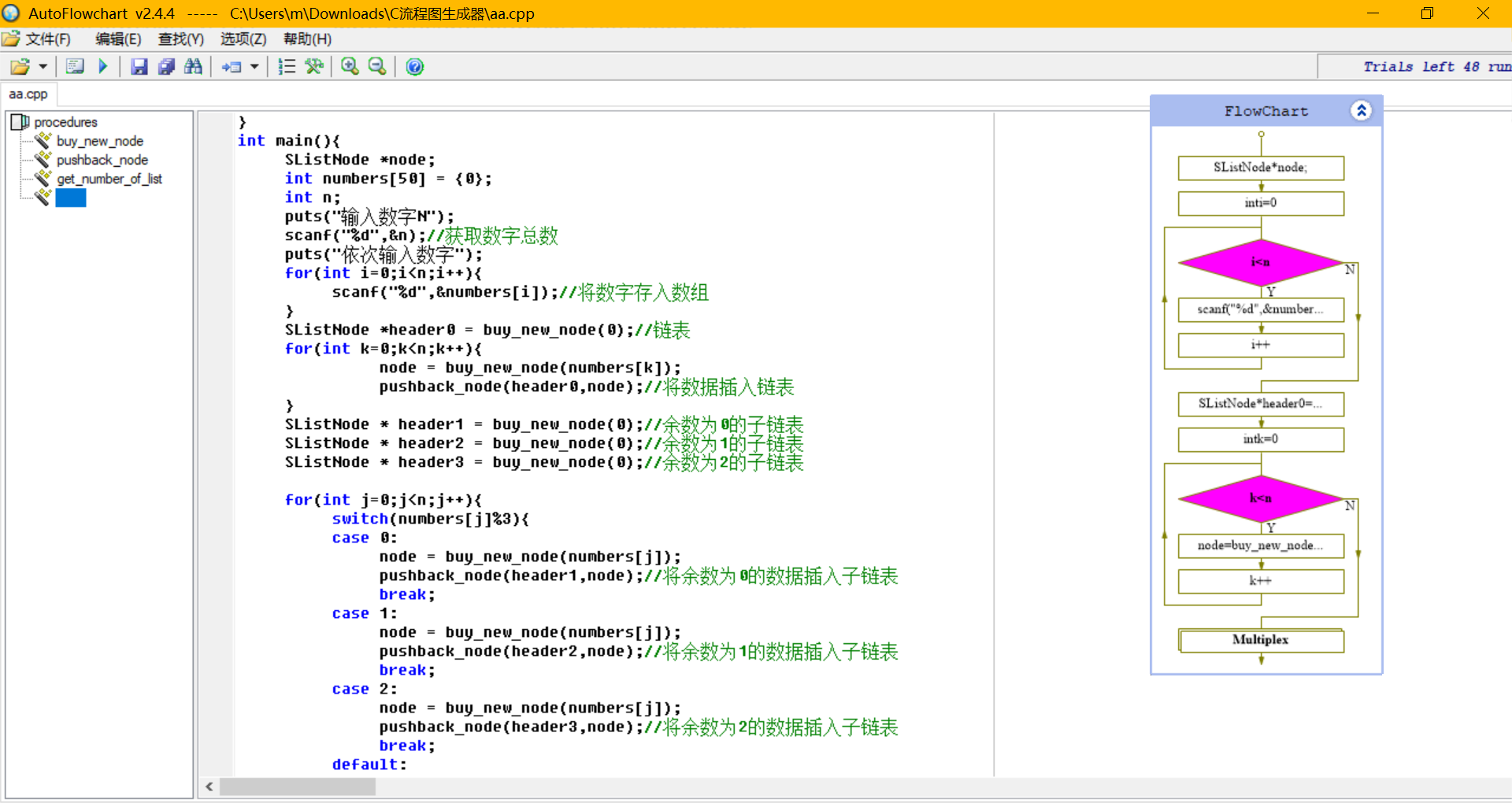
结果