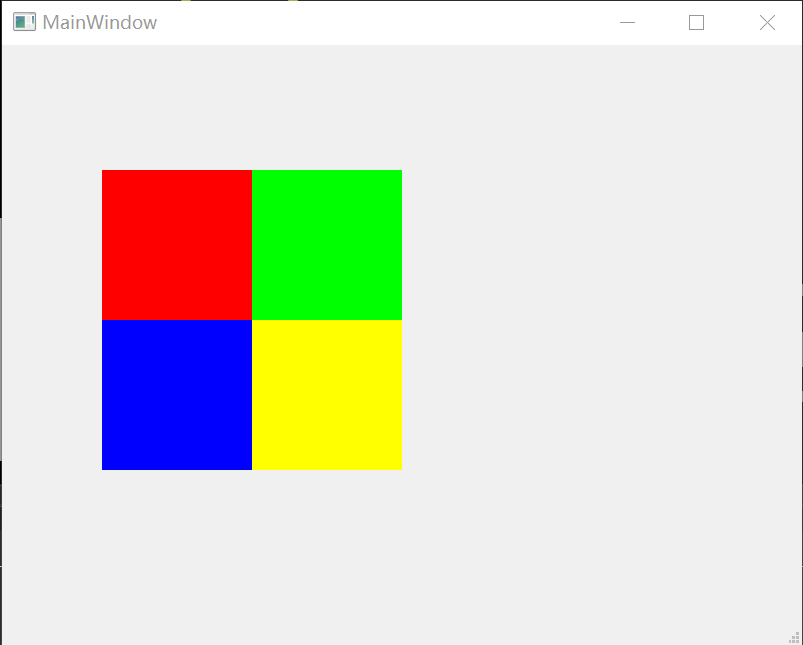
对于一个二维数组数据,储存地图信息,其中1、2、3、4代表不同的颜色,如何将它生成图像?
生成该二维数组
#define PIC_WIDTH 300

#define PIC_HEIGHT 300

...

    //生成图像数据二维数组,分为四个区域代表不同颜色

    int data[PIC_HEIGHT][PIC_WIDTH] = {0};

    for(int i=0;i<PIC_HEIGHT;i++){

        for(int j=0;j<PIC_WIDTH;j++){

            if(i<PIC_HEIGHT/2&&j<PIC_WIDTH/2){

                data[i][j] = 1;

            }else if(i<PIC_HEIGHT/2&&j>=PIC_WIDTH/2){

                data[i][j] = 2;

            }else if(i>=PIC_HEIGHT/2&&j<PIC_WIDTH/2){

                data[i][j] = 3;

            }else if(i>=PIC_HEIGHT/2&&j>=PIC_WIDTH/2){

                data[i][j] = 4;

            }

        }

    }
将二维数组中的数据生成对应的rgba数据,从而显示图像
由二维数组生成图像的rgba数据算法,本人写了两种算法
算法1
    //开辟空间储存图像数据

    uchar *pPicData = (uchar*)malloc(PIC_WIDTH*PIC_HEIGHT*4*sizeof(uchar));

    //指向data[0][0]的int型指针

    int *pData = data[0];

    //生成图像数据

    for (int i=0;i<PIC_WIDTH*PIC_HEIGHT;i++) {

        switch(*(pData+i)){

        case 1:

            pPicData[i*4+0] = 0;//B

            pPicData[i*4+1] = 0;//G

            pPicData[i*4+2] = 255;//R

            pPicData[i*4+3] = 255;//A

            break;

        case 2:

            pPicData[i*4+0] = 0;//B

            pPicData[i*4+1] = 255;//G

            pPicData[i*4+2] = 0;//R

            pPicData[i*4+3] = 255;//A

            break;

        case 3:

            pPicData[i*4+0] = 255;//B

            pPicData[i*4+1] = 0;//G

            pPicData[i*4+2] = 255;//R

            pPicData[i*4+3] = 255;//A

            break;

        case 4:

            pPicData[i*4+0] = 255;//B

            pPicData[i*4+1] = 0;//G

            pPicData[i*4+2] = 0;//R

            pPicData[i*4+3] = 255;//A

            break;

        }

    }
算法2
    for(int i=0;i<PIC_HEIGHT;i++){

        for(int j=0;j<PIC_WIDTH;j++){

            switch(data[i][j]){

            case 1:

                pPicData[(i*PIC_WIDTH + j)*4 + 0] = 0;

                pPicData[(i*PIC_WIDTH + j)*4 + 1] = 0;

                pPicData[(i*PIC_WIDTH + j)*4 + 2] = 255;

                pPicData[(i*PIC_WIDTH + j)*4 + 3] = 255;

                break;

            case 2:

                pPicData[(i*PIC_WIDTH + j)*4 + 0] = 0;

                pPicData[(i*PIC_WIDTH + j)*4 + 1] = 255;

                pPicData[(i*PIC_WIDTH + j)*4 + 2] = 0;

                pPicData[(i*PIC_WIDTH + j)*4 + 3] = 255;

                break;

            case 3:

                pPicData[(i*PIC_WIDTH + j)*4 + 0] = 255;

                pPicData[(i*PIC_WIDTH + j)*4 + 1] = 0;

                pPicData[(i*PIC_WIDTH + j)*4 + 2] = 0;

                pPicData[(i*PIC_WIDTH + j)*4 + 3] = 255;

                break;

            case 4:

                pPicData[(i*PIC_WIDTH + j)*4 + 0] = 0;

                pPicData[(i*PIC_WIDTH + j)*4 + 1] = 255;

                pPicData[(i*PIC_WIDTH + j)*4 + 2] = 255;

                pPicData[(i*PIC_WIDTH + j)*4 + 3] = 255;

                break;

            }

        }

    }
QImage的构造函数,可以从RGBA数据生成图像
QImage::QImage(uchar *data, int width, int height, Format format, QImageCleanupFunction cleanupFunction = Q_NULLPTR, void *cleanupInfo = Q_NULLPTR)

Constructs an image with the given width, height and format, that uses an existing memory buffer, data. The width and height must be specified in pixels, data must be 32-bit aligned, and each scanline of data in the image must also be 32-bit aligned.

The buffer must remain valid throughout the life of the QImage and all copies that have not been modified or otherwise detached from the original buffer. The image does not delete the buffer at destruction. You can provide a function pointer cleanupFunction along with an extra pointer cleanupInfo that will be called when the last copy is destroyed.

If format is an indexed color format, the image color table is initially empty and must be sufficiently expanded with setColorCount() or setColorTable() before the image is used.
    //从rgba数据生成图像

    QImage image(pPicData,PIC_WIDTH,PIC_HEIGHT,QImage::Format_RGB32);

    QPixmap pixmap = QPixmap::fromImage(image);

    ui->label->setPixmap(pixmap);
效果