gtk的label标签文本设置,在gtk库程序携带的文档中可以找到Text Attribute Markup,相对路径为/share/gtk-doc/html/pango/PangoMarkupFormat.html
Text Attribute Markup

Text Attribute Markup — Simple markup language to encode text with attributes


Pango Text Attribute Markup Language

Frequently, you want to display some text to the user with attributes applied to part of the text (for example, you might want bold or italicized words). With the base Pango interfaces, you could create a PangoAttrList and apply it to the text; the problem is that you'd need to apply attributes to some numeric range of characters, for example "characters 12-17." This is broken from an internationalization standpoint; once the text is translated, the word you wanted to italicize could be in a different position.


The solution is to include the text attributes in the string to be translated. Pango provides this feature with a small markup language. You can parse a marked-up string into the string text plus a PangoAttrList using the function pango_parse_markup().


A simple example of a marked-up string might be: "<span foreground="blue" size="x-large">Blue text</span> is <i>cool</i>!"


The root tag of a marked-up document is <markup>, but pango_parse_markup() allows you to omit this tag, so you will most likely never need to use it. The most general markup tag is <span>, then there are some convenience tags. <span> has the following attributes:


<span> attributes


font_desc


A font description string, such as "Sans Italic 12". See pango_font_description_from_string() for a description of the format of the string representation . Note that any other span attributes will override this description. So if you have "Sans Italic" and also a style="normal" attribute, you will get Sans normal, not italic.


font_family


A font family name


face


Synonym for font_family


size


Font size in 1024ths of a point, or one of the absolute sizes 'xx-small', 'x-small', 'small', 'medium', 'large', 'x-large', 'xx-large', or one of the relative sizes 'smaller' or 'larger'. If you want to specify a absolute size, it's usually easier to take advantage of the ability to specify a partial font description using 'font_desc'; you can use font_desc='12.5' rather than size='12800'.


style


One of 'normal', 'oblique', 'italic'


weight


One of 'ultralight', 'light', 'normal', 'bold', 'ultrabold', 'heavy', or a numeric weight


variant


'normal' or 'smallcaps'


stretch


One of 'ultracondensed', 'extracondensed', 'condensed', 'semicondensed', 'normal', 'semiexpanded', 'expanded', 'extraexpanded', 'ultraexpanded'


foreground


An RGB color specification such as '#00FF00' or a color name such as 'red'


background


An RGB color specification such as '#00FF00' or a color name such as 'red'


underline


One of 'none', 'single', 'double', 'low', 'error'


underline_color


The color of underlines; an RGB color specification such as '#00FF00' or a color name such as 'red'


rise


Vertical displacement, in 10000ths of an em. Can be negative for subscript, positive for superscript.


strikethrough


'true' or 'false' whether to strike through the text


strikethrough_color


The color of strikethrough lines; an RGB color specification such as '#00FF00' or a color name such as 'red'


fallback


'true' or 'false' whether to enable fallback. If disabled, then characters will only be used from the closest matching font on the system. No fallback will be done to other fonts on the system that might contain the characters in the text. Fallback is enabled by default. Most applications should not disable fallback.


lang


A language code, indicating the text language


letter_spacing


Inter-letter spacing in 1024ths of a point.


gravity


One of 'south', 'east', 'north', 'west', 'auto'.


gravity_hint


One of 'natural', 'strong', 'line'.


The following convenience tags are provided:


Convenience tags


b


Bold


big


Makes font relatively larger, equivalent to <span size="larger">


i


Italic


s


Strikethrough


sub


Subscript


sup


Superscript


small


Makes font relatively smaller, equivalent to <span size="smaller">


tt


Monospace font


u


Underline
使用gtk_label_set_markup ()设置标签文本属性
void

gtk_label_set_markup (GtkLabel *label,

                      const gchar *str);

Parses str which is marked up with the Pango text markup language, setting the label's text and attribute list based on the parse results. If the str is external data, you may need to escape it with g_markup_escape_text() or g_markup_printf_escaped():


char *markup;


markup = g_markup_printf_escaped ("<span style=\"italic\">%s</span>", str);

gtk_label_set_markup (GTK_LABEL (label), markup);

g_free (markup);

Parameters

label


a GtkLabel


str


a markup string (see Pango markup format)
测试代码
#include<gtk/gtk.h>

int main(int argc,char* argv[]){


    GtkWidget *window;

    GtkWidget *vBox;

    gtk_init(&argc,&argv);

    //建立主窗口

    window=gtk_window_new(GTK_WINDOW_TOPLEVEL);

    gtk_window_set_title(GTK_WINDOW(window),"Demo");

    gtk_window_set_default_size(GTK_WINDOW(window),300,200);

    //垂直盒装容器

    vBox = gtk_vbox_new(FALSE,0);

    gtk_container_add(GTK_CONTAINER(window),vBox);

    //添加标签到容器

    //

    GtkWidget *label0 = gtk_label_new("");

    //颜色,斜体,下划线

    gtk_label_set_markup(GTK_LABEL(label0),"<span foreground=\"#800080\" style=\"italic\" underline=\"single\">aassddfgghhjkl\nqwerty</span>");

    gtk_box_pack_start(GTK_BOX(vBox),label0,TRUE,TRUE,10);


    GtkWidget *label1 = gtk_label_new("");

    //前景背景色

    gtk_label_set_markup(GTK_LABEL(label1),"<span foreground=\"#447a2a\" background=\"#91fae0\">aassddfgghhjkl\nqwerty</span>");

    gtk_box_pack_start(GTK_BOX(vBox),label1,TRUE,TRUE,10);


    GtkWidget *label2 = gtk_label_new("");

    //字体和大小

    gtk_label_set_markup(GTK_LABEL(label2),"<span foreground=\"#abcdef\" font_family=\"Kristen ITC\" size=\"22222\">aassddfgghhjkl\nqwerty</span>");

    gtk_box_pack_start(GTK_BOX(vBox),label2,TRUE,TRUE,10);

    //连接回调函数

    g_signal_connect(G_OBJECT(window),"destroy",G_CALLBACK(gtk_main_quit),NULL);

    //显示窗口

    gtk_widget_show_all(window);


    gtk_main();

    return 0;

}
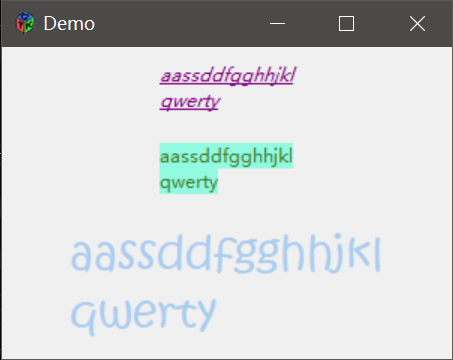
gdkcolor的参考文档:share/gtk-doc/html/gdk/gdk-Colormaps-and-Colors.html#GdkColor
GdkColor

typedef struct {

  guint32 pixel;

  guint16 red;

  guint16 green;

  guint16 blue;

} GdkColor;

The GdkColor structure is used to describe an allocated or unallocated color.


guint32 pixel;


For allocated colors, the value used to draw this color on the screen.

guint16 red;


The red component of the color. This is a value between 0 and 65535, with 65535 indicating full intensitiy.

guint16 green;


The blue component of the color.

guint16 blue;


The green component of the color.
设置gdkcolor,rgb属性的取值0-65535
或者从英文解析颜色
设置控件外观的函数
gtk_widget_modify_base ()
void
gtk_widget_modify_base (GtkWidget *widget,
GtkStateType state,
const GdkColor *color);
Sets the base color for a widget in a particular state. All other style values are left untouched. The base color is the background color used along with the text color (see gtk_widget_modify_text()) for widgets such as GtkEntry and GtkTextView. See also gtk_widget_modify_style().
Note that "no window" widgets (which have the GTK_NO_WINDOW flag set) draw on their parent container's window and thus may not draw any background themselves. This is the case for e.g. GtkLabel. To modify the background of such widgets, you have to set the base color on their parent; if you want to set the background of a rectangular area around a label, try placing the label in a GtkEventBox widget and setting the base color on that.
Parameters
widget
a GtkWidget
state
the state for which to set the base color
color
the color to assign (does not need to be allocated), or NULL to undo the effect of previous calls to of gtk_widget_modify_base().
gtk_widget_modify_bg ()
void
gtk_widget_modify_bg (GtkWidget *widget,
GtkStateType state,
const GdkColor *color);
Sets the background color for a widget in a particular state. All other style values are left untouched. See also gtk_widget_modify_style().
Note that "no window" widgets (which have the GTK_NO_WINDOW flag set) draw on their parent container's window and thus may not draw any background themselves. This is the case for e.g. GtkLabel. To modify the background of such widgets, you have to set the background color on their parent; if you want to set the background of a rectangular area around a label, try placing the label in a GtkEventBox widget and setting the background color on that.
Parameters
widget
a GtkWidget
state
the state for which to set the background color
color
the color to assign (does not need to be allocated), or NULL to undo the effect of previous calls to of gtk_widget_modify_bg().
gtk_widget_modify_fg ()
void
gtk_widget_modify_fg (GtkWidget *widget,
GtkStateType state,
const GdkColor *color);
Sets the foreground color for a widget in a particular state. All other style values are left untouched. See also gtk_widget_modify_style().
Parameters
widget
a GtkWidget
state
the state for which to set the foreground color
color
the color to assign (does not need to be allocated), or NULL to undo the effect of previous calls to of gtk_widget_modify_fg().
gtk_widget_modify_font ()
void
gtk_widget_modify_font (GtkWidget *widget,
PangoFontDescription *font_desc);
Sets the font to use for a widget. All other style values are left untouched. See also gtk_widget_modify_style().
Parameters
widget
a GtkWidget
font_desc
the font description to use, or NULL to undo the effect of previous calls to gtk_widget_modify_font().
gtk_widget_modify_text ()
void
gtk_widget_modify_text (GtkWidget *widget,
GtkStateType state,
const GdkColor *color);
Sets the text color for a widget in a particular state. All other style values are left untouched. The text color is the foreground color used along with the base color (see gtk_widget_modify_base()) for widgets such as GtkEntry and GtkTextView. See also gtk_widget_modify_style().
Parameters
widget
a GtkWidget
state
the state for which to set the text color
color
the color to assign (does not need to be allocated), or NULL to undo the effect of previous calls to of gtk_widget_modify_text().
测试代码
#include<gtk/gtk.h>
int main(int argc,char* argv[]){
GtkWidget *window;
GtkWidget *entry;
gtk_init(&argc,&argv);
//建立主窗口
window=gtk_window_new(GTK_WINDOW_TOPLEVEL);
gtk_window_set_title(GTK_WINDOW(window),"Demo");
gtk_window_set_default_size(GTK_WINDOW(window),300,200);
//输入框
entry = gtk_entry_new();
gtk_container_add(GTK_CONTAINER(window),entry);
//设置窗体背景色
    GdkColor color0;

    color0.red = 32222;

    color0.green = 42222;

    color0.blue = 52222;
gtk_widget_modify_bg (GTK_WIDGET(window), GTK_STATE_NORMAL,&color0);//背景颜色
//设置输入框颜色
GdkColor color1;
gdk_color_parse ("pink", &color1);
gtk_widget_modify_base (GTK_WIDGET(entry), GTK_STATE_NORMAL,&color1);//基本颜色
GdkColor color2;
gdk_color_parse ("purple", &color2);
gtk_widget_modify_text (GTK_WIDGET(entry), GTK_STATE_NORMAL,&color2);//文本颜色
//设置输入框字体
PangoFontDescription *fontDesc = pango_font_description_from_string("Lucida Handwriting");//字体选择
pango_font_description_set_size (fontDesc, 15 * PANGO_SCALE);//字体大小
gtk_widget_modify_font (GTK_WIDGET(entry), fontDesc);//设置字体
pango_font_description_free (fontDesc);//释放字体
//连接回调函数
g_signal_connect(G_OBJECT(window),"destroy",G_CALLBACK(gtk_main_quit),NULL);
//显示窗口
gtk_widget_show_all(window);
gtk_main();
return 0;
}
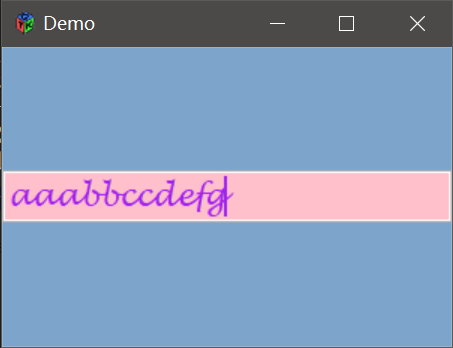
按钮设置文本颜色以及透明
取出按钮中的标签,对标签设置颜色属性
gtk_bin_get_child ()
GtkWidget *

gtk_bin_get_child (GtkBin *bin);

Gets the child of the GtkBin, or NULL if the bin contains no child widget. The returned widget does not have a reference added, so you do not need to unref it.


Parameters

bin


a GtkBin


Returns

pointer to child of the GtkBin.
按键透明设置
gtk_button_set_relief ()
代码
#include<gtk/gtk.h>

int main(int argc,char* argv[]){


    GtkWidget *window;

    GtkWidget *hBox;

    gtk_init(&argc,&argv);

    //建立主窗口

    window=gtk_window_new(GTK_WINDOW_TOPLEVEL);

    gtk_window_set_title(GTK_WINDOW(window),"Demo");

    gtk_widget_set_size_request(window,360,240);

    //窗体背景色

    GdkColor color0;

    color0.red = 32222;

    color0.green = 42222;

    color0.blue = 52222;

    gtk_widget_modify_bg (GTK_WIDGET(window), GTK_STATE_NORMAL,&color0);

    //设置容器边距

    gtk_container_set_border_width(GTK_CONTAINER(window),5);

    //水平盒状容器

    hBox = gtk_hbox_new(FALSE,0);

    gtk_container_add(GTK_CONTAINER(window),hBox);

    //添加按钮到容器

    //

    GtkWidget *buttonaaa = gtk_button_new_with_label("buttonaaa");

    GtkWidget *buttonbbb = gtk_button_new_with_label("buttonbbb");

    GtkWidget *buttonccc = gtk_button_new_with_label("buttonccc");

    GtkWidget *buttonddd = gtk_button_new_with_label("buttonddd");

    gtk_box_pack_start(GTK_BOX(hBox),buttonaaa,TRUE,TRUE,5);

    gtk_box_pack_start(GTK_BOX(hBox),buttonbbb,TRUE,TRUE,5);

    gtk_box_pack_start(GTK_BOX(hBox),buttonccc,TRUE,TRUE,5);

    gtk_box_pack_start(GTK_BOX(hBox),buttonddd,TRUE,TRUE,5);

    //设置按钮透明

        gtk_button_set_relief(GTK_BUTTON(buttonaaa),GTK_RELIEF_NONE);

        gtk_button_set_relief(GTK_BUTTON(buttonbbb),GTK_RELIEF_NONE);

        gtk_button_set_relief(GTK_BUTTON(buttonccc),GTK_RELIEF_NONE);

        gtk_button_set_relief(GTK_BUTTON(buttonddd),GTK_RELIEF_NONE);

    //设置按钮颜色

    GtkWidget *labela = gtk_bin_get_child(GTK_BIN(buttonaaa));

    char *markupa;

    markupa = g_markup_printf_escaped ("<span foreground=\"#0000ff\">%s</span>",gtk_button_get_label(GTK_BUTTON(buttonaaa)));

    gtk_label_set_markup(GTK_LABEL(labela),markupa);

    g_free (markupa);


    GtkWidget *labelb = gtk_bin_get_child(GTK_BIN(buttonbbb));

    char *markupb;

    markupb = g_markup_printf_escaped ("<span foreground=\"#00ff00\">%s</span>",gtk_button_get_label(GTK_BUTTON(buttonbbb)));

    gtk_label_set_markup(GTK_LABEL(labelb),markupb);

    g_free (markupb);


    GtkWidget *labelc = gtk_bin_get_child(GTK_BIN(buttonccc));

    char *markupc;

    markupc = g_markup_printf_escaped ("<span foreground=\"#ff0000\">%s</span>",gtk_button_get_label(GTK_BUTTON(buttonccc)));

    gtk_label_set_markup(GTK_LABEL(labelc),markupc);

    g_free (markupc);


    GtkWidget *labeld = gtk_bin_get_child(GTK_BIN(buttonddd));

    char *markupd;

    markupd = g_markup_printf_escaped ("<span foreground=\"#ff00ff\">%s</span>",gtk_button_get_label(GTK_BUTTON(buttonddd)));

    gtk_label_set_markup(GTK_LABEL(labeld),markupd);

    g_free (markupd);

    //连接回调函数

    g_signal_connect(G_OBJECT(window),"destroy",G_CALLBACK(gtk_main_quit),NULL);

    //显示窗口

    gtk_widget_show_all(window);


    gtk_main();

    return 0;

}
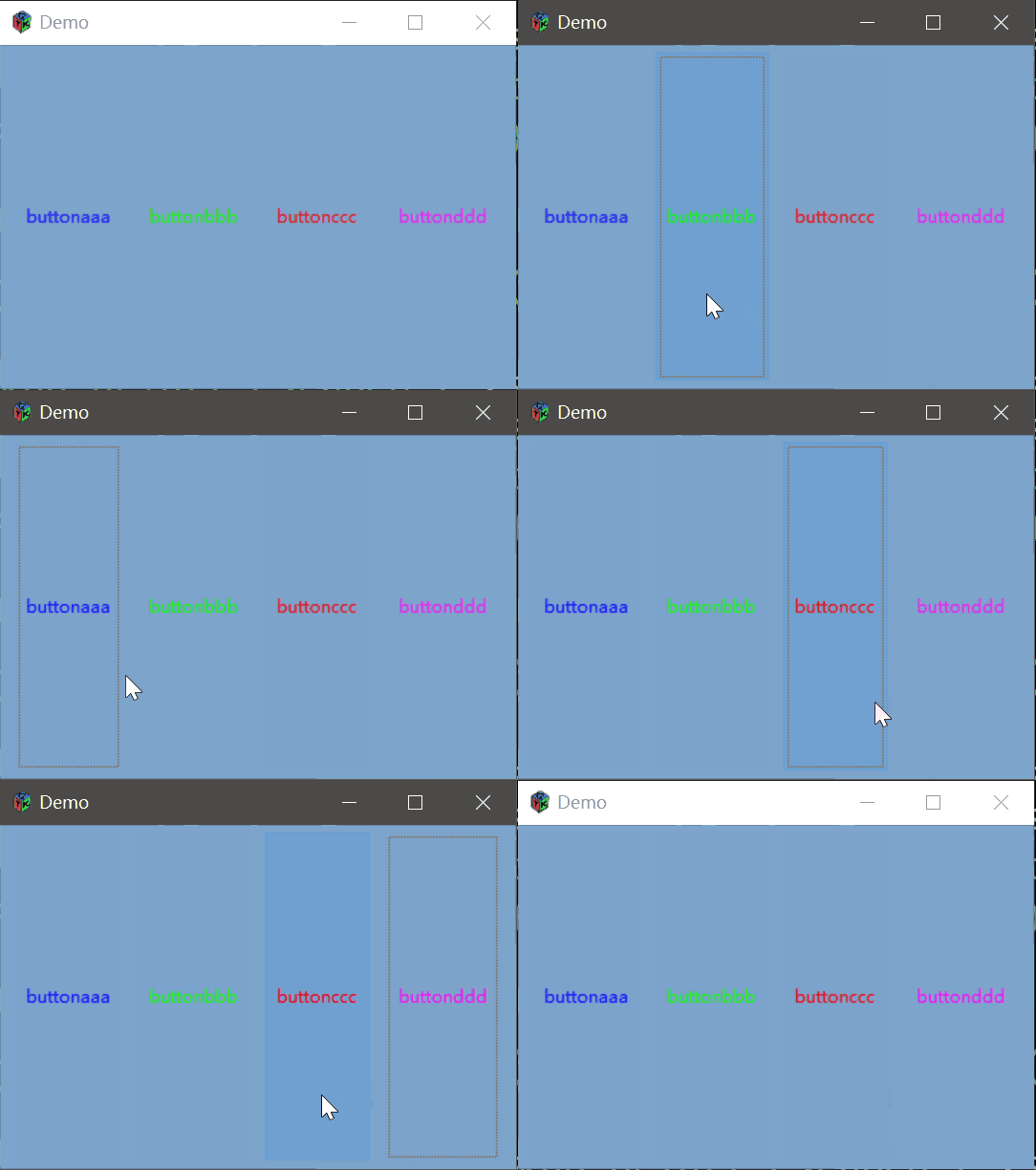
另外的控件通用办法:
颜色:
GdkColor color;


gdk_color_parse ("颜色(如green,red,blue)", &color);


gtk_widget_modify_text (GTK_WIDGET(控件), GTK_STATE_NORMAL, &color);//文本颜色


gtk_widget_modify_bg (GTK_WIDGET(控件), GTK_STATE_NORMAL, &color);//背景色


gtk_widget_modify_fg (GTK_WIDGET(控件), GTK_STATE_NORMAL, &color);//前景色
字体: