GTK窗口属于只能容纳一个控件的容器,因此只能向窗口中加入一个控件,如果向窗口中加一个能容纳多个控件的容器,再向此容器中添加其他别的控件,就可以实现向窗口中添加多个控件
GTK+2.0 中能容纳多个控件的容器主要有盒状容器(GtkBox)、格状容器(GtkTable)、按钮盒(GtkButtonBox)、分隔面板(GtkPanel)、固定布局(GtkFixed)、工具栏(GtkToolbar)等,其中最常用的是盒状容器和格状容器
本文介绍使用GTK2.0中的自由布局(GtkFixed)和表格布局(GtkTable)
自由布局(固定布局)
GtkFixed
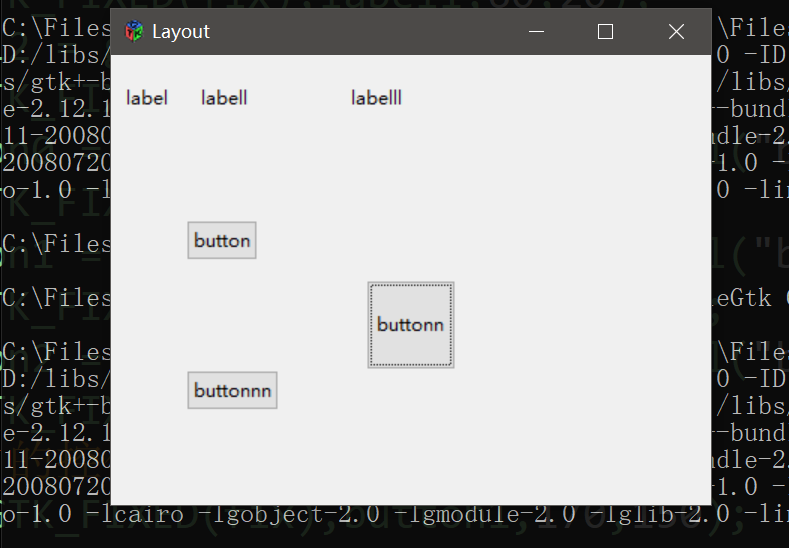
自由布局中,可以在加入容器时,设置每个控件在容器中的位置
水平、垂直和表格布局容器,控件会跟着容器大小的变化进行自动适应,而自由布局容器里的控件则不会跟着变化。
函数
GtkWidget * gtk_fixed_new ()//自由布局的创建

void    gtk_fixed_put ()//布局容器添加控件

void    gtk_fixed_move ()//移动布局里控件的位置

gboolean    gtk_fixed_get_has_window ()//Gets whether the GtkFixed has its own GdkWindow

void    gtk_fixed_set_has_window ()//Sets whether a GtkFixed widget is created with a separate GdkWindow for widget->window or not
控件在容器中,可以设置大小,调整控件大小的函数
代码示例
#include<gtk/gtk.h>

int main(int argc,char* argv[]){

    GtkWidget* window;

    GtkWidget* fix;

    //gtk初始化

    gtk_init(&argc,&argv);

    //创建窗口

    window = gtk_window_new(GTK_WINDOW_TOPLEVEL);

    gtk_window_set_title(GTK_WINDOW(window),"Layout");

    gtk_window_set_default_size(GTK_WINDOW(window),400,300);

    //新的自由布局

    fix = gtk_fixed_new();

    gtk_container_add(GTK_CONTAINER(window),fix);

    //将控件添加进自由布局

    GtkWidget *label0 = gtk_label_new("label");

    gtk_fixed_put(GTK_FIXED(fix),label0,10,20);

    GtkWidget *label1 = gtk_label_new("labell");

    gtk_fixed_put(GTK_FIXED(fix),label1,60,20);

    GtkWidget *label2 = gtk_label_new("labelll");

    gtk_fixed_put(GTK_FIXED(fix),label2,160,20);

    GtkWidget *button0 = gtk_button_new_with_label("button");

    gtk_fixed_put(GTK_FIXED(fix),button0,50,110);

    GtkWidget *button1 = gtk_button_new_with_label("buttonn");

    gtk_fixed_put(GTK_FIXED(fix),button1,150,110);

    GtkWidget *button2 = gtk_button_new_with_label("buttonnn");

    gtk_fixed_put(GTK_FIXED(fix),button2,50,210);

    //移动自由布局内的控件

    gtk_fixed_move(GTK_FIXED(fix),button1,170,150);

    //调整控件大小

    gtk_widget_set_size_request(button1,60,60);

    //信号连接

    g_signal_connect(G_OBJECT(window),"destroy",G_CALLBACK(gtk_main_quit),NULL);

    //显示窗体

    gtk_widget_show_all(window);

    //gtk主函数

    gtk_main();


return 0;

}
表格布局
gtk_table_new()创建表格布局
GtkWidget*          gtk_table_new                       (guint rows,

                                                         guint columns,

                                                         gboolean homogeneous);

Used to create a new table widget. An initial size must be given by specifying how many rows and columns the table should have, although this can be changed later with gtk_table_resize(). rows and columns must both be in the range 0 .. 65535.


rows :


The number of rows the new table should have.

columns :


The number of columns the new table should have.

homogeneous :


If set to TRUE, all table cells are resized to the size of the cell containing the largest widget.

Returns :


A pointer to the the newly created table widget.
gtk_table_attach_defaults()添加控件到布局
void                gtk_table_attach_defaults           (GtkTable *table,

                                                         GtkWidget *widget,

                                                         guint left_attach,

                                                         guint right_attach,

                                                         guint top_attach,

                                                         guint bottom_attach);

As there are many options associated with gtk_table_attach(), this convenience function provides the programmer with a means to add children to a table with identical padding and expansion options. The values used for the GtkAttachOptions are GTK_EXPAND | GTK_FILL, and the padding is set to 0.


table :


The table to add a new child widget to.

widget :


The child widget to add.

left_attach :


The column number to attach the left side of the child widget to.

right_attach :


The column number to attach the right side of the child widget to.

top_attach :


The row number to attach the top of the child widget to.

bottom_attach :


The row number to attach the bottom of the child widget to.
gtk_table_attach()添加控件到布局
void                gtk_table_attach                    (GtkTable *table,

                                                         GtkWidget *child,

                                                         guint left_attach,

                                                         guint right_attach,

                                                         guint top_attach,

                                                         guint bottom_attach,

                                                         GtkAttachOptions xoptions,

                                                         GtkAttachOptions yoptions,

                                                         guint xpadding,

                                                         guint ypadding);

Adds a widget to a table. The number of 'cells' that a widget will occupy is specified by left_attach, right_attach, top_attach and bottom_attach. These each represent the leftmost, rightmost, uppermost and lowest column and row numbers of the table. (Columns and rows are indexed from zero).


table :


The GtkTable to add a new widget to.

child :


The widget to add.

left_attach :


the column number to attach the left side of a child widget to.

right_attach :


the column number to attach the right side of a child widget to.

top_attach :


the row number to attach the top of a child widget to.

bottom_attach :


the row number to attach the bottom of a child widget to.

xoptions :


Used to specify the properties of the child widget when the table is resized.

yoptions :


The same as xoptions, except this field determines behaviour of vertical resizing.

xpadding :


An integer value specifying the padding on the left and right of the widget being added to the table.

ypadding :


The amount of padding above and below the child widget.
table是表格布局容器,child是添加到容器中的控件,guint left_attach,guint right_attach,guint top_attach,guint bottom_attach,是控件边缘在布局中的位置
3x3的table容器为例子,布局位置参考
| 位置(0,1,0,1) | 位置(1,2,0,1) | 位置(2,3,0,1) |
|---|---|---|
| 位置(0,1,1,2) | 位置(1,2,1,2) | 位置(2,3,1,2) |
| 位置(0,1,2,3) | 位置(1,2,2,3) | 位置(2,3,2,3) |
xoptions,yoptions表示该控件具有的扩展属性。
对于扩展属性标志
GTK_EXPAND 小部件应该展开以占用其容器中已分配的任何额外空间
GTK_SHRINK 小部件应尽可能缩小
GTK_FILL 小部件应该填充分配给它的空间
guint xpadding是一个整数值,指定要添加到表中的小部件左侧和右侧的填充,guint ypadding是子控件上方和下方的填充量
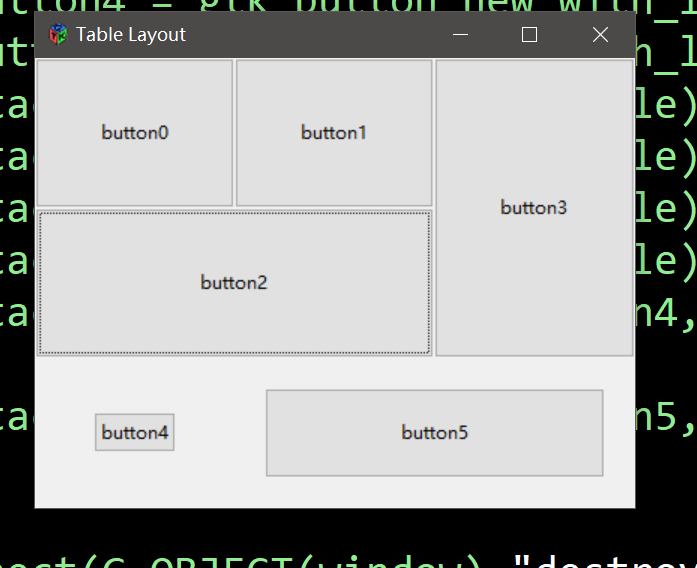
对于padding,如果你不想控件占满一个格子,很简单的办法是指定xpadding和ypadding为非0数值。他会在控件和格子边缘空出一部分,或者是使用gtk_widget_set_size_request手动调整控件大小,个人感觉这种办法更加麻烦一些。
测试代码:
#include<gtk/gtk.h>

int main(int argc,char* argv[]){

    GtkWidget* window;

    GtkWidget* table;

    //gtk初始化

    gtk_init(&argc,&argv);

    //创建窗口

    window = gtk_window_new(GTK_WINDOW_TOPLEVEL);

    gtk_window_set_title(GTK_WINDOW(window),"Table Layout");

    gtk_window_set_default_size(GTK_WINDOW(window),400,300);

    //创建table容器

    table = gtk_table_new(3,3,true);

    gtk_container_add(GTK_CONTAINER(window),table);

    //添加控件到容器

    GtkWidget *button0 = gtk_button_new_with_label("button0");

    GtkWidget *button1 = gtk_button_new_with_label("button1");

    GtkWidget *button2 = gtk_button_new_with_label("button2");

    GtkWidget *button3 = gtk_button_new_with_label("button3");

    GtkWidget *button4 = gtk_button_new_with_label("button4");

    GtkWidget *button5 = gtk_button_new_with_label("button5");

    gtk_table_attach_defaults(GTK_TABLE(table),button0,0,1,0,1);

    gtk_table_attach_defaults(GTK_TABLE(table),button1,1,2,0,1);

    gtk_table_attach_defaults(GTK_TABLE(table),button2,0,2,1,2);

    gtk_table_attach_defaults(GTK_TABLE(table),button3,2,3,0,2);

    gtk_table_attach(GTK_TABLE(table),button4,0,1,2,3,GTK_SHRINK,GTK_SHRINK,0,0);

    gtk_table_attach(GTK_TABLE(table),button5,1,3,2,3,GTK_FILL,GTK_FILL,20,20);

    //信号连接

    g_signal_connect(G_OBJECT(window),"destroy",G_CALLBACK(gtk_main_quit),NULL);

    //显示窗体

    gtk_widget_show_all(window);

    //gtk主函数

    gtk_main();


return 0;

}