设置窗体背景图片的gdk_window_set_back_pixmap ()函数
gdk_window_set_back_pixmap ()

void                gdk_window_set_back_pixmap          (GdkWindow *window,

                                                         GdkPixmap *pixmap,

                                                         gboolean parent_relative);

Sets the background pixmap of window. May also be used to set a background of "None" on window, by setting a background pixmap of NULL.


A background pixmap will be tiled, positioning the first tile at the origin of window, or if parent_relative is TRUE, the tiling will be done based on the origin of the parent window (useful to align tiles in a parent with tiles in a child).


A background pixmap of NULL means that the window will have no background. A window with no background will never have its background filled by the windowing system, instead the window will contain whatever pixels were already in the corresponding area of the display.


The windowing system will normally fill a window with its background when the window is obscured then exposed, and when you call gdk_window_clear().


window :


a GdkWindow

pixmap :


a GdkPixmap, or NULL

parent_relative :


whether the tiling origin is at the origin of window's parent
改变窗体背景的方法
//设置背景图

void chang_background(GtkWidget *widget,const gchar *imgPath)

{

  //允许窗口可以绘图

  gtk_widget_set_app_paintable(widget,TRUE);

  gtk_widget_realize(widget);

  //重绘窗口

  gtk_widget_queue_draw(widget);

  //获取窗口大小

  gint width,height;

  gdk_drawable_get_size(GDK_DRAWABLE(widget->window), &width, &height);

  //加载图片

  GdkPixbuf *srcPixbuf = gdk_pixbuf_new_from_file(imgPath, NULL);

  //调整图片大小到适合控件

  GdkPixbuf *dstPixbuf = gdk_pixbuf_scale_simple(srcPixbuf,width,height, GDK_INTERP_BILINEAR);


  GdkPixmap *pixmap = NULL;

  //创建pixmap图像 最后参数是透明度

  gdk_pixbuf_render_pixmap_and_mask(dstPixbuf, &pixmap, NULL,55);

  //设置背景图

  gdk_window_set_back_pixmap(widget->window, pixmap, FALSE);

  // 释放资源

  g_object_unref(srcPixbuf);

  g_object_unref(dstPixbuf);

  g_object_unref(pixmap);

}
由于开始设置的窗体图片大小是固定的,窗体调整大小时会导致图片重叠排布,因此需要根据窗体大小的变化动态调整图片大小
窗体大小和位置发生改变时,会触发的信号
The “configure-event” signal
gboolean

user_function (GtkWidget *widget,

               GdkEvent  *event,

               gpointer   user_data)

The ::configure-event signal will be emitted when the size, position or stacking of the widget 's window has changed.


To receive this signal, the GdkWindow associated to the widget needs to enable the GDK_STRUCTURE_MASK mask. GDK will enable this mask automatically for all new windows.


Parameters

widget


the object which received the signal


event


the GdkEventConfigure which triggered this signal.


[type Gdk.EventConfigure]

user_data


user data set when the signal handler was connected.


Returns

TRUE to stop other handlers from being invoked for the event. FALSE to propagate the event further.

Flags: Run Last
返回值如果是true会阻止configure-event事件传播,导致盒装容器不能随窗体大小而变化,并且不能实时刷新扩展的窗体区域,因此最好返回false,将事件交给后续处理过程
加入回调函数,在窗体改变时,自动更新背景图片
//窗体大小位置发生变化时

gboolean my_configure_event(GtkWidget *widget,

               GdkEvent  *event,

               gpointer   user_data){

  // 设置窗口背景图

  chang_background(widget,"bg1.jpg");

  //返回false交给后续处理事件

  return false;

}
测试代码
#include <gtk/gtk.h>


//设置背景图

void chang_background(GtkWidget *widget,const gchar *imgPath)

{

  //允许窗口可以绘图

  gtk_widget_set_app_paintable(widget,TRUE);

  gtk_widget_realize(widget);


  //重绘窗口

  gtk_widget_queue_draw(widget);

  //获取窗口大小

  gint width,height;

  gdk_drawable_get_size(GDK_DRAWABLE(widget->window), &width, &height);

  //加载图片

  GdkPixbuf *srcPixbuf = gdk_pixbuf_new_from_file(imgPath, NULL);

  //调整图片大小到适合控件

  GdkPixbuf *dstPixbuf = gdk_pixbuf_scale_simple(srcPixbuf,width,height, GDK_INTERP_BILINEAR);


  GdkPixmap *pixmap = NULL;

  //创建pixmap图像 最后参数是透明度

  gdk_pixbuf_render_pixmap_and_mask(dstPixbuf, &pixmap, NULL,55);

  //设置背景图

  gdk_window_set_back_pixmap(widget->window, pixmap, FALSE);

  // 释放资源

  g_object_unref(srcPixbuf);

  g_object_unref(dstPixbuf);

  g_object_unref(pixmap);

}

//窗体大小位置发生变化时

gboolean my_configure_event(GtkWidget *widget,

               GdkEvent  *event,

               gpointer   user_data){

  // 设置窗口背景图

  chang_background(widget,"bg1.jpg");

  //返回false交给后续处理事件

  return false;

}

int main( int argc, char *argv[])

{

  GtkWidget *hBox;

  gtk_init(&argc, &argv);


  //主窗口

  GtkWidget *window = gtk_window_new(GTK_WINDOW_TOPLEVEL);

  gtk_window_set_title(GTK_WINDOW(window), "window");

  gtk_widget_set_size_request(window, 300, 200);

  //设置容器边距

  gtk_container_set_border_width(GTK_CONTAINER(window),15);

  //窗体控件

  hBox = gtk_hbox_new(FALSE,0);

  gtk_container_add(GTK_CONTAINER(window),hBox);

  GtkWidget *button = gtk_button_new_with_label("button");

  gtk_box_pack_start(GTK_BOX(hBox),button,TRUE,TRUE,10);

  GtkWidget *buttonn = gtk_button_new_with_label("buttonn");

  gtk_box_pack_start(GTK_BOX(hBox),buttonn,TRUE,TRUE,10);

  GtkWidget *buttonnn = gtk_button_new_with_label("buttonnn");

  gtk_box_pack_start(GTK_BOX(hBox),buttonnn,TRUE,TRUE,10);


  // 显示所有部件

  gtk_widget_show_all(window);

  g_signal_connect(G_OBJECT(window),"destroy",G_CALLBACK(gtk_main_quit),NULL);

  g_signal_connect(G_OBJECT(window),"configure-event",G_CALLBACK(my_configure_event),NULL);

  gtk_main();


  return 0;

}
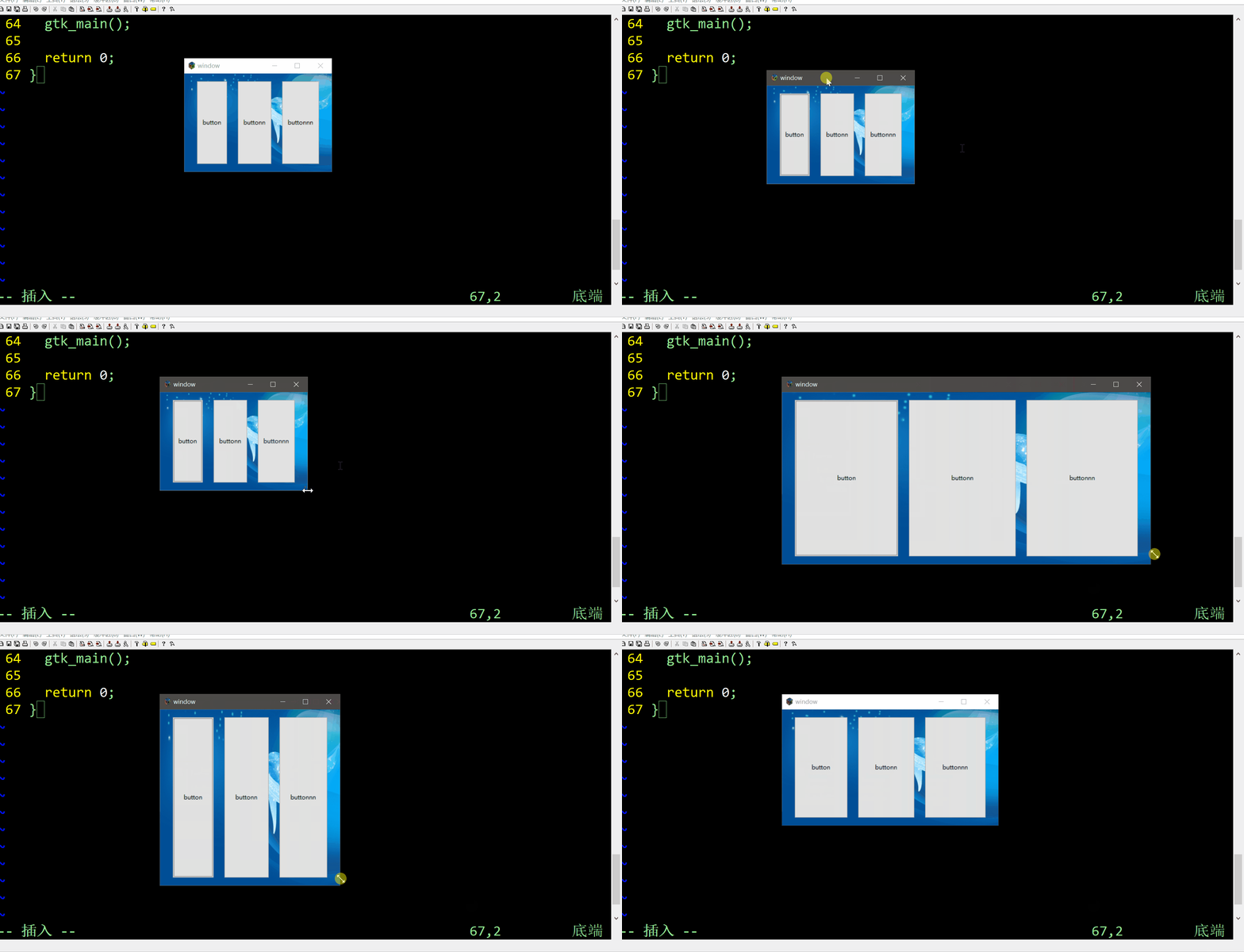
设置窗体初始大小时,如果使用
使用gtk_window_get_default_size可以读取到正确的窗体大小,但是会导致gdk_drawable_get_size函数获取错误的窗体大小,因此使用的是gtk_widget_set_size_request函数调整窗体大小