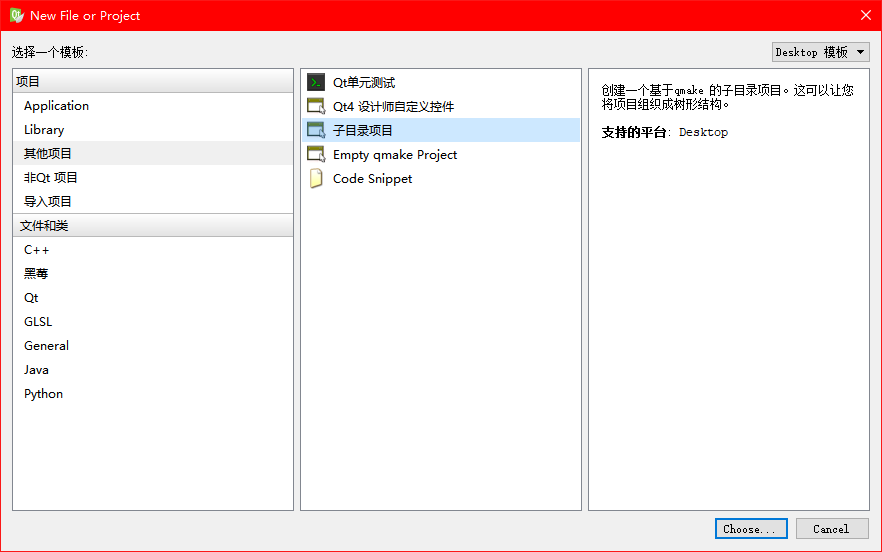
QT建立一个子目录项目,添加client和server两个项目
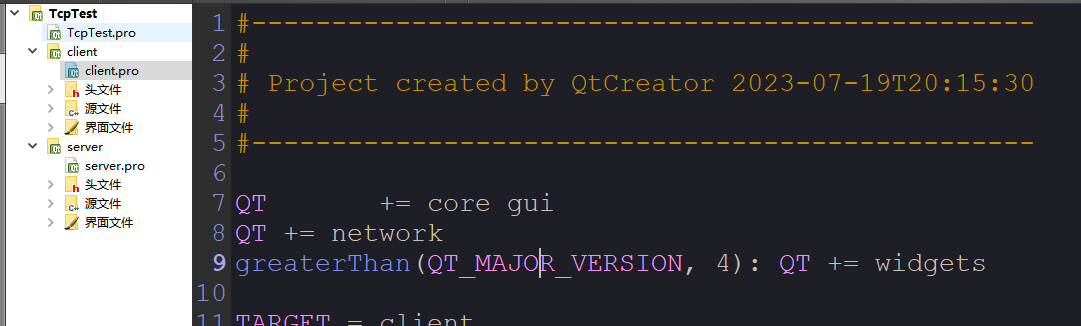
项目pro文件中添加
QT += network
需要的头文件
客户端代码
#ifndef MAINWINDOW_H
#define MAINWINDOW_H
#include <QMainWindow>
#include <QtNetwork>
#include <QTcpSocket>
namespace Ui {
class MainWindow;
}
class MainWindow : public QMainWindow
{
Q_OBJECT
public:
explicit MainWindow(QWidget *parent = 0);
~MainWindow();
QTcpSocket *sock;//tcp套接字
protected slots:
void connect_2_server();//连接到服务端
void connect_success();//连接成功
void disconnect_server();//与服务端断开连接
void dis_connetcted();//连接断开
void read_data();//接收数据
void send_data();//发送数据
private:
Ui::MainWindow *ui;
};
#endif // MAINWINDOW_H
#include "mainwindow.h"
#include "ui_mainwindow.h"
MainWindow::MainWindow(QWidget *parent) :
QMainWindow(parent),
ui(new Ui::MainWindow)
{
ui->setupUi(this);
//创建tcp套接字
sock = new QTcpSocket();
//连接、断开连接、发送数据按钮执行的函数
connect(ui->pushButton,SIGNAL(clicked()),this,SLOT(connect_2_server()));
connect(ui->pushButton_2,SIGNAL(clicked()),this,SLOT(disconnect_server()));
connect(ui->pushButton_3,SIGNAL(clicked()),this,SLOT(send_data()));
//新连接
connect(sock,SIGNAL(connected()),this,SLOT(connect_success()));
//断开连接
connect(sock,SIGNAL(disconnected()),this,SLOT(dis_connetcted()));
//数据到达
connect(sock,SIGNAL(readyRead()),this,SLOT(read_data()));
}
MainWindow::~MainWindow()
{
delete ui;
}
void MainWindow::connect_2_server()
{
QString ip = ui->lineEdit->text();
QString port = ui->lineEdit_2->text();
sock->connectToHost(ip, port.toInt());
}
void MainWindow::disconnect_server()
{
sock->close();
}
void MainWindow::connect_success()
{
ui->textEdit->append("已连接");
}
void MainWindow::dis_connetcted()
{
ui->textEdit->append("连接断开");
}
void MainWindow::read_data()
{
QByteArray data = sock->readAll();//读取数据
QString msg = QString::fromUtf8(data);
ui->textEdit->append(msg);//显示数据
}
void MainWindow::send_data()
{
QString msg = ui->lineEdit_3->text();
QByteArray data = msg.toUtf8();
sock->write(data);//发送数据
ui->textEdit->append(msg);
}
服务端代码
#ifndef MAINWINDOW_H
#define MAINWINDOW_H
#include <QMainWindow>
#include <QtNetwork>

#include <QTcpServer>

#include <QTcpSocket>
namespace Ui {
class MainWindow;
}
class MainWindow : public QMainWindow
{
Q_OBJECT
public:
explicit MainWindow(QWidget *parent = 0);
~MainWindow();
QTcpServer *tcpServer;//服务端
QTcpSocket *client_sock;//客户端套接字
protected slots:
void new_connection();//新的客户端连接
void read_data();//接收数据
void dis_connetcted();//连接断开
private:
Ui::MainWindow *ui;
};
#endif // MAINWINDOW_H
#include "mainwindow.h"

#include "ui_mainwindow.h"


MainWindow::MainWindow(QWidget *parent) :

    QMainWindow(parent),

    ui(new Ui::MainWindow)

{

    ui->setupUi(this);

    //新建tcp服务端

    tcpServer = new QTcpServer();

    //监听所有网卡的1234端口

    tcpServer->listen(QHostAddress::Any, 1234);

    //新连接槽函数关联

    connect(tcpServer, SIGNAL(newConnection()), this,SLOT(new_connection()));

}


MainWindow::~MainWindow()

{

    tcpServer->close();

    delete ui;

}


void MainWindow::new_connection(){

    //获取新客户端连接

    client_sock = tcpServer->nextPendingConnection();

    //获取客户端ip地址

    QString caddr = client_sock->peerAddress().toString();

    ui->textEdit->append("新连接"+caddr);

    //连接接收数据槽函数

    connect(client_sock, SIGNAL(readyRead()), this,SLOT(read_data()));

    //连接连接断开槽函数

    connect(client_sock, SIGNAL(disconnected()), this,SLOT(dis_connetcted()));


}


void MainWindow::dis_connetcted()

{

    ui->textEdit->append("连接断开");

}

void MainWindow::read_data()

{

    QByteArray data = client_sock->readAll();//读取数据

    QString msg = QString::fromUtf8(data);

    ui->textEdit->append(msg);//显示客户端消息

    //自动回复

    client_sock->write("自动回复");

}
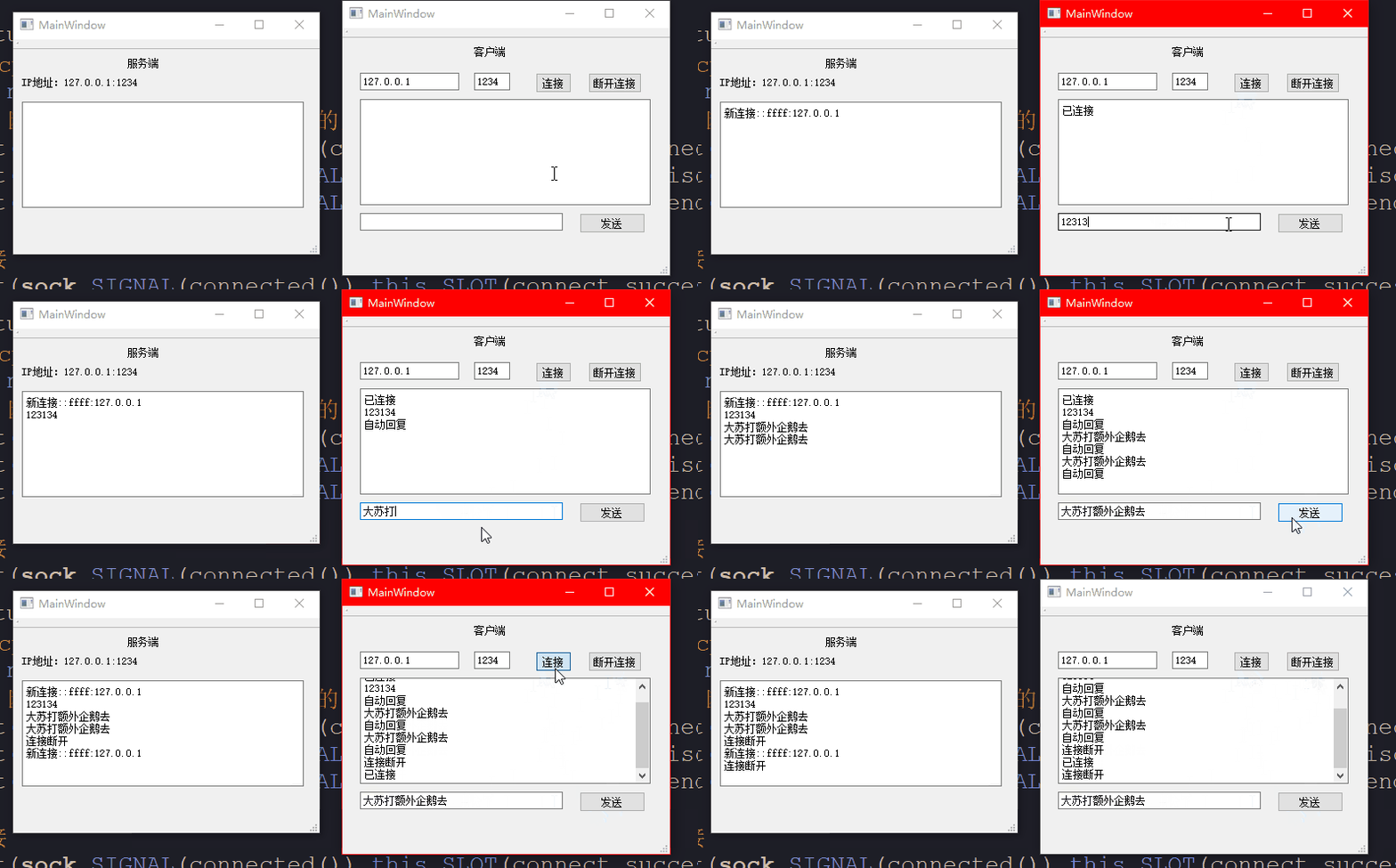
演示