贝塞尔曲线于1962年由法国工程师皮埃尔·贝塞尔(Pierre Bézier)所广泛发表,他运用贝塞尔曲线来为汽车的主体进行设计。
一般参数公式
贝兹曲线可如下推断。给定点P0、P1、…、Pn,其贝兹曲线即:

几何学的方向上理解贝塞尔曲线:
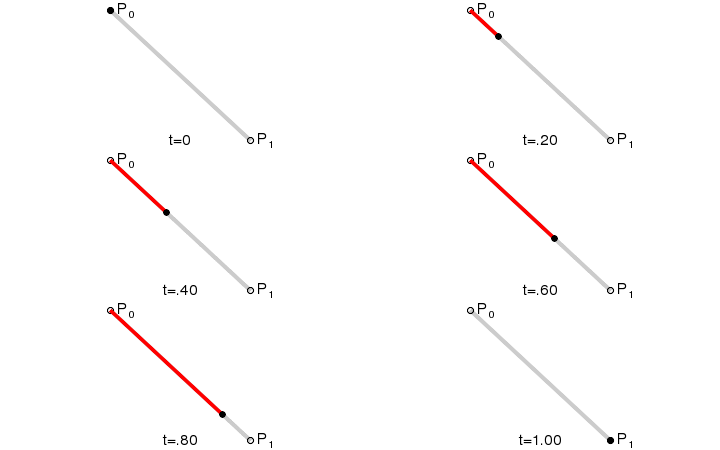
一阶贝塞尔曲线
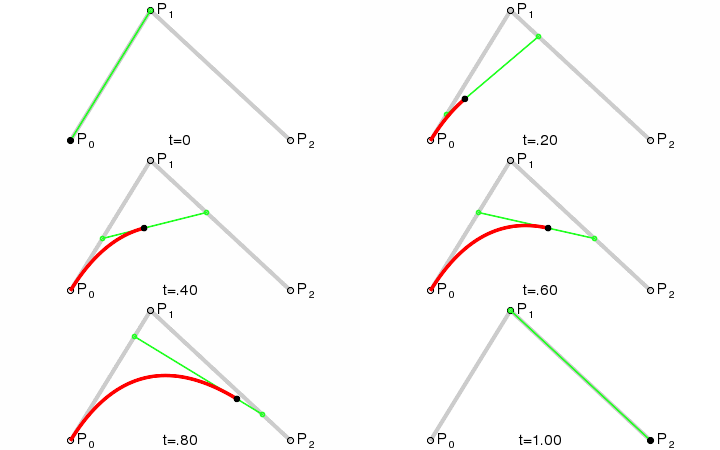
二阶贝塞尔曲线
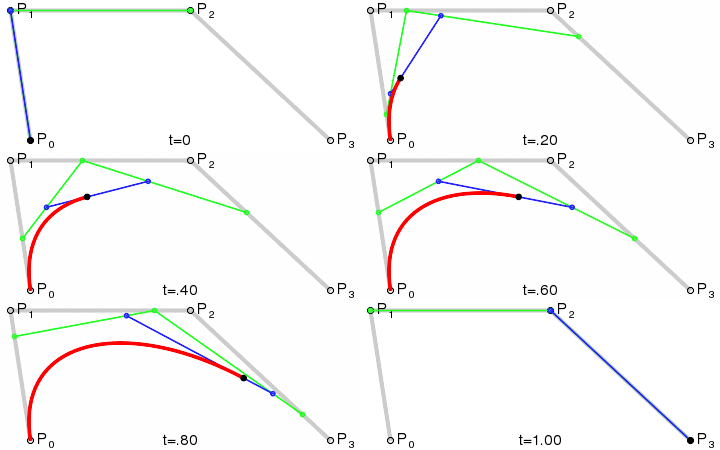
三阶贝塞尔曲线
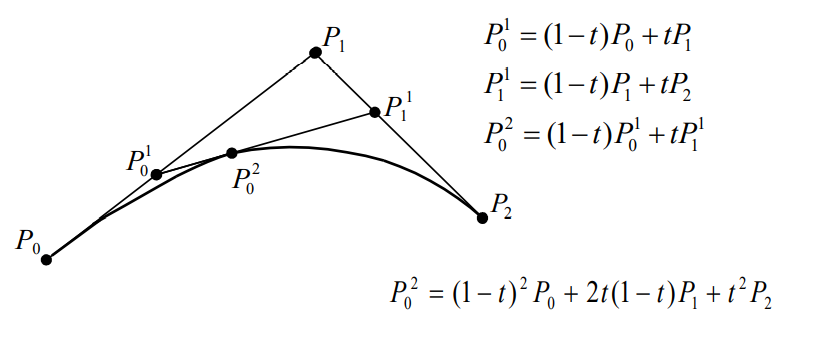
贝塞尔曲线点计算方法
使用c++graphics图形库实现代码
#include<iostream>

#include<graphics.h>

#include<conio.h>

#include<vector>

#include<windows.h>

using namespace std;

struct PointXY{

    int x;

    int y;

};


void drawBezier(vector<PointXY> v){


    initgraph(1000, 700);

    for (int i = 0; i < v.size()-1; i++)

    {

        line(v.at(i).x,v.at(i).y,v.at(i+1).x,v.at(i+1).y);

    }

    for (float t = 0; t <= 1; t += 0.001){

        vector<PointXY> vt = v;

        for(;vt.size()>1;){

            for(int i=0;i<vt.size()-1;i++){

                vt.at(i).x = (1 - t) * vt.at(i).x + t * vt.at(i+1).x;

                vt.at(i).y = (1 - t) * vt.at(i).y + t * vt.at(i+1).y;

            }

            vt.pop_back();

        }

        putpixel(vt.at(0).x, vt.at(0).y, GREEN);

        Sleep(1);


    }

    _getch();

    closegraph();

}

int main(void)

{

    //绘制(100,200)(200,400)(400,100)三个点的贝塞尔曲线

    vector<PointXY> v;

    PointXY xy;

    xy.x = 100;

    xy.y = 200;

    v.push_back(xy);

    xy.x = 200;

    xy.y = 400;

    v.push_back(xy);

    xy.x = 400;

    xy.y = 100;

    v.push_back(xy);

    drawBezier(v);

    return 0;

}
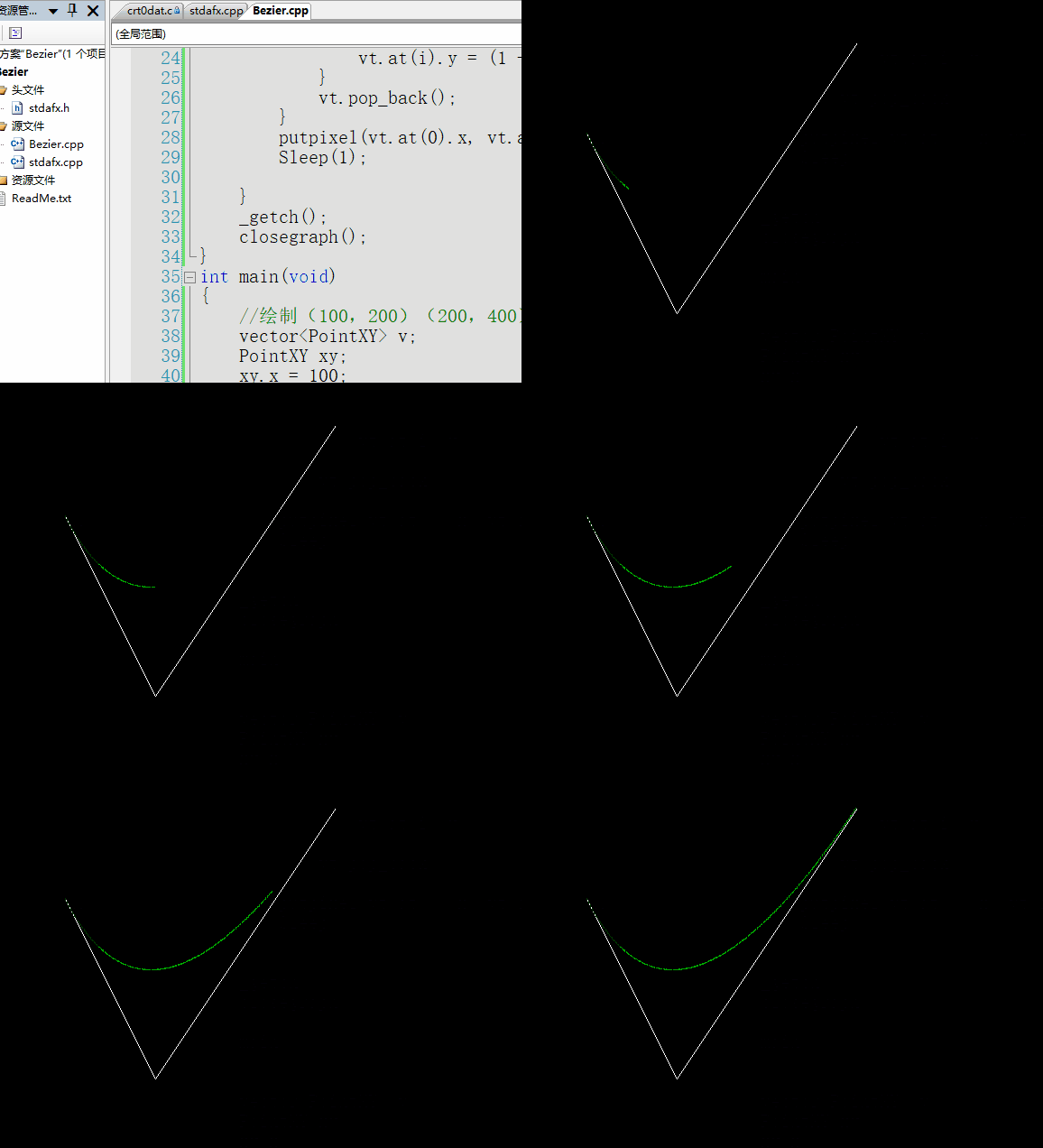
演示
缓动动画
使用三次贝塞尔曲线cubic-bezier,生成速度曲线的函数,规定是cubic-bezier(x1,y1,x2,y2)
三次贝塞尔曲线需要四个点来定义,P0 、P1 、P2、P3。P0、P1、P2、P3 四个点在平面或在三维空间中定义了三次方贝塞尔曲线。曲线起始于 P0 走向 P1,并从 P2 的方向来到 P3。一般不会经过 P1 或 P2;这两个点只是在那里提供方向资讯。
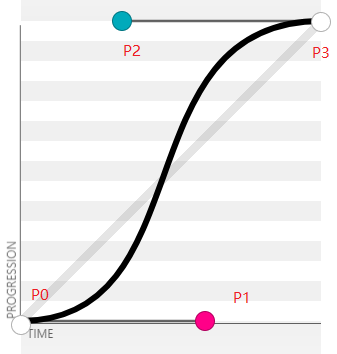
通过公式 t 在 [0, 1] 上运动,得到一条开始于 [0, 0],终止于 [1, 1] 的曲线,我们将动画当前已运行的时间除以目标时长,得到缩放到 [0, 1] 区间的值 x,那么 x 作为横坐标在曲线上会对应一个唯一点,得到该点的 y。因为 P0,P3 固定,假设我们需要平滑的从 0 运动到 500,那么这 500 也被缩放到了 [0, 1] 区间。将 y 重新缩放到回我们的目标区间,就得到了中间帧元素应该处于的位置。简单点就是,x 轴代表时间进度, y 轴代表动画完成的进度。
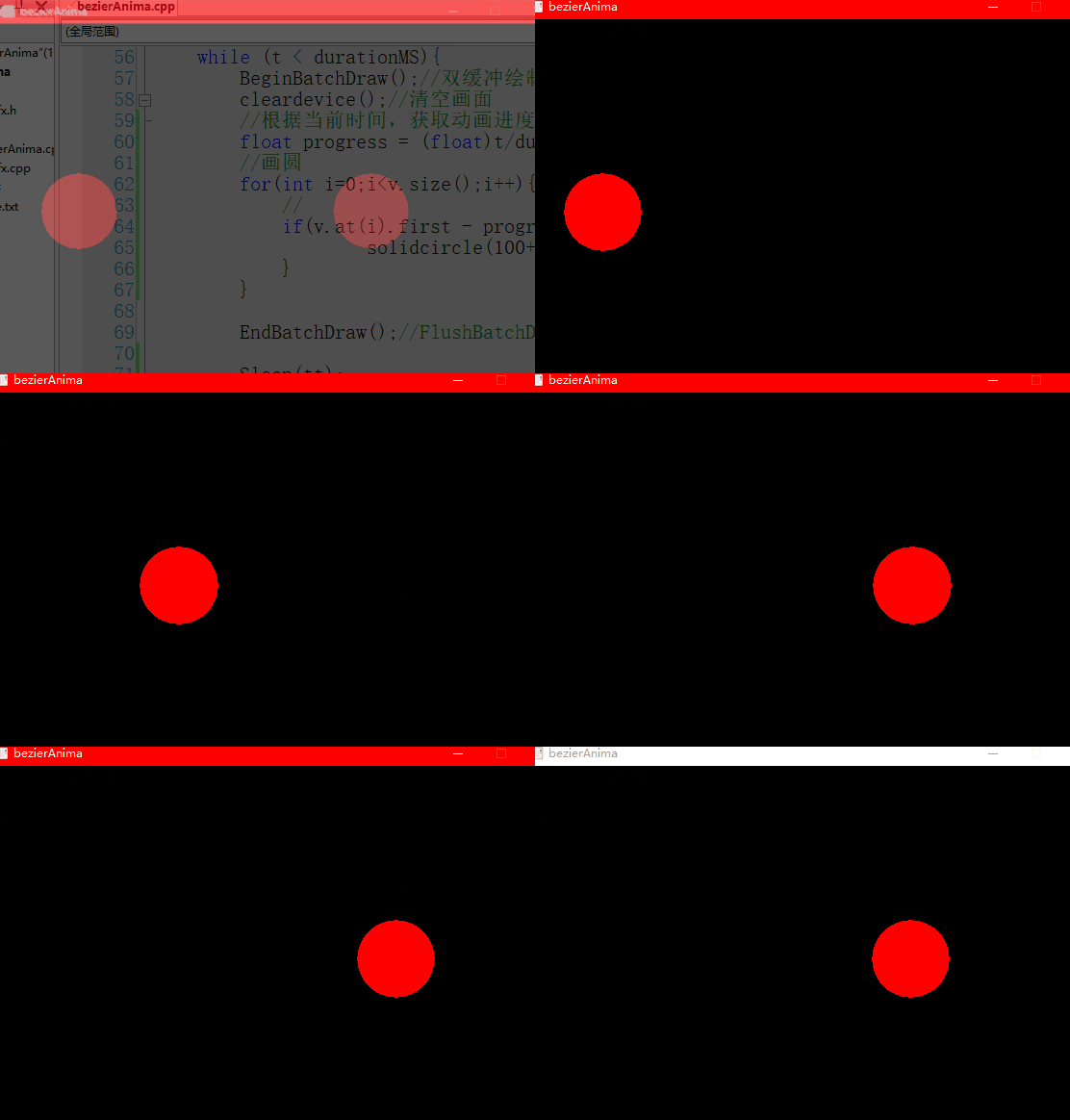
这里有一点需要注意的是,P1 和 P2 点允许超出由 P0 和 P3 点所划分出的矩形区域。导致曲线也可能超出矩形区域,也就是函数值不一定落在 [0, 1] 区间内,这时候就形成一个弹性动画,即元素经过预期位置后还会继续运动,但在最终时刻还是会返回预期位置。
代码
#include "stdafx.h"

#include<iostream>

#include<graphics.h>

#include<conio.h>

#include<vector>

#include <windows.h>

using namespace std;

//计算三阶贝塞尔曲线 返回1000个轨迹点

vector<pair<float,float> > cubicBezier(float x1, float y1, float x2, float y2){


    vector<pair<float,float> > v;


    float x0 = 0.0f;

    float y0 = 0.0f;

    float x3 = 1.0f;

    float y3 = 1.0f;


    for (float t = 0; t <= 1; t += 0.001){

        float x0_1 = (1-t) * x0 + t * x1;

        float y0_1 = (1-t) * y0 + t * y1;


        float x1_1 = (1-t) * x1 + t * x2;

        float y1_1 = (1-t) * y1 + t * y2;


        float x2_1 = (1-t) * x2 + t * x3;

        float y2_1 = (1-t) * y2 + t * y3;


        float x0_2 = (1-t) * x0_1 + t * x1_1;

        float y0_2 = (1-t) * y0_1 + t * y1_1;


        float x1_2 = (1-t) * x1_1 + t * x2_1;

        float y1_2 = (1-t) * y1_1 + t * y2_1;


        float x0_3 = (1-t) * x0_2 + t * x1_2;

        float y0_3 = (1-t) * y0_2 + t * y1_2;


        pair<float,float> p;

        p.first = x0_3;

        p.second = y0_3;

        v.push_back(p);

    }

    return v;

}

//绘制动画

void drawAnimation(vector<pair<float,float> > v, long durationMS){

    long t = 0 ;//逝去时间

    int tt = 5;//动画帧间隔


    initgraph(600, 400);

    setfillcolor(RGB(255,0,0));//设置颜色

    while (t < durationMS){

        BeginBatchDraw();//双缓冲绘制

        cleardevice();//清空画面

        //根据当前时间,获取动画进度

        float progress = (float)t/durationMS;

        //画圆

        for(int i=0;i<v.size();i++){

            //

            if(v.at(i).first - progress >= -0.001 && v.at(i).first - progress <= 0.001){//浮点数判断相等

                    solidcircle(100+v.at(i).second*300,200,40);//x起始点100,运动范围0-300,y点200,半径40的圆

            }

        }


        EndBatchDraw();//FlushBatchDraw();


        Sleep(tt);

        t += tt;

    }


    _getch();

    closegraph();


}

int main(){

    vector<pair<float,float> > v = cubicBezier(0.6f,0.0f,0.3f,1.0f);

    drawAnimation(v,1000);//绘制缓动动画

    v = cubicBezier(0.6f,-0.5f,0.3f,1.5f);

    drawAnimation(v,1000);//绘制回弹动画

    return 0;

}
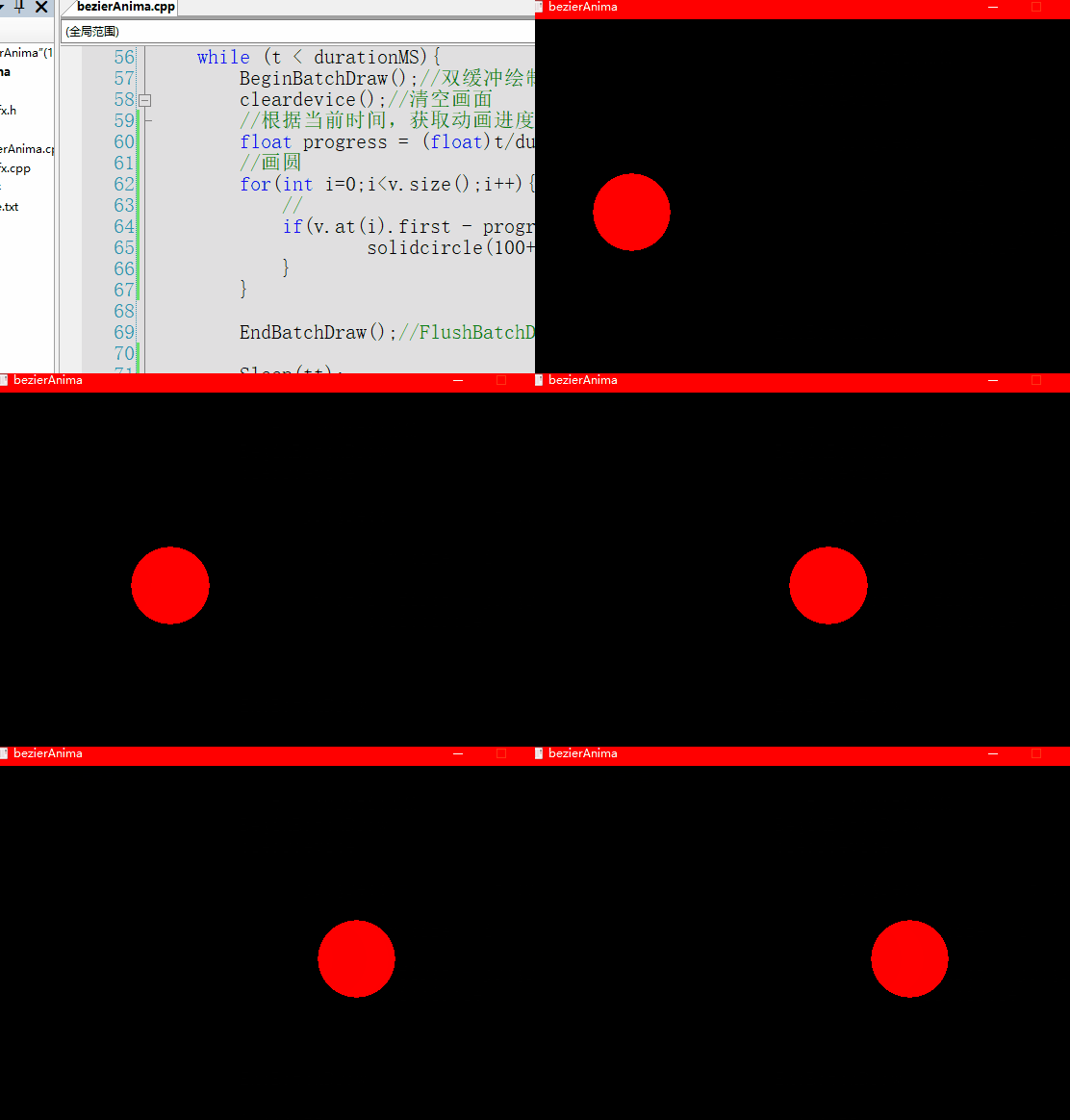
效果
回弹动画
动画演示网站