通常,GTK 窗口的形状都是矩形的。但是,通过使用gtk_widget_shape_combine_mask函数,可以将一个 mask 应用于窗口,使窗口的形状变为 mask 所表示的非矩形形状。
函数原型如下:
void                gtk_widget_shape_combine_mask       (GtkWidget *widget,

                                                         GdkBitmap *shape_mask,

                                                         gint offset_x,

                                                         gint offset_y);

Sets a shape for this widget's GDK window. This allows for transparent windows etc., see gdk_window_shape_combine_mask() for more information.


widget :


a GtkWidget

shape_mask :


shape to be added, or NULL to remove an existing shape

offset_x :


X position of shape mask with respect to window

offset_y :


Y position of shape mask with respect to window
掩码是一个GdkBitmap对象,它被用作一个二进制图像,其中每个像素表示窗口部件中对应位置像素是否可见。如果掩码的像素值为1,则该位置的像素可见;如果像素值为0,则该位置的像素不可见。
使用gtk_widget_shape_combine_mask函数可以将掩码应用于一个窗口部件,使得只有掩码中对应位置像素为1的区域显示出来,其他区域被裁剪掉,从而创建一个不规则的窗体。
这个函数通常与GtkWindow类或继承自GtkWidget 的其他窗口类一起使用。它允许在窗口上创建自定义的形状,例如圆角窗口或其他非矩形形状窗口。在调用 gtk_widget_shape_combine_mask 函数之前,需要确保窗口的类型为 GTK_WINDOW_POPUP。
需要注意的是,使用该函数需要小心处理窗口的输入和事件处理,因为不规则的形状可能会影响鼠标事件的捕捉和窗口的交互方式。
下面是我写的测试代码
#include <gtk/gtk.h>

 int main(int argc, char *argv[])

 {

    GtkWidget *window;

    GtkWidget *label;

    gtk_init(&argc, &argv);

    //建立窗体

    window = gtk_window_new(GTK_WINDOW_TOPLEVEL);

    gtk_window_set_title(GTK_WINDOW(window), "demo");

    gtk_window_set_default_size(GTK_WINDOW(window), 400, 300);

    gtk_window_set_decorated(GTK_WINDOW(window),FALSE);//去除标题栏

    g_signal_connect(window, "destroy",G_CALLBACK(gtk_main_quit), NULL);

    //标签

    label = gtk_label_new("hello test");

    gtk_container_add(GTK_CONTAINER(window), label);

    gtk_widget_show_all(window);


    //设置窗体形状

    GdkGC *gc;

    GdkColormap *colormap;

    GdkBitmap *shapeBitmap;

    GdkColor black;

    GdkColor white;

    //获取黑白颜色(代表0和1的像素)

    colormap = gdk_colormap_get_system ();

    gdk_color_black (colormap, & black);

    gdk_color_white (colormap, & white);

    //新建bitmap

    shapeBitmap = (GdkBitmap *) gdk_pixmap_new (NULL, 400, 300, 1);

    //新建绘图gc

    gc = gdk_gc_new (shapeBitmap);


    //设置shapeBitmap黑色背景

    gdk_gc_set_foreground (gc, & black);

    gdk_draw_rectangle (shapeBitmap, gc, TRUE, 0, 0, 400, 300);

    //shapeBitmap画一个白色椭圆

    gdk_gc_set_foreground (gc, & white);

    gdk_draw_arc (shapeBitmap, gc,TRUE,-40, -40, 480, 380, 0, 360*64);


    //画一个黑色椭圆,等于在窗口里挖一个洞

    //gdk_gc_set_foreground (gc, & black);

    //gdk_draw_arc (shapeBitmap, gc,TRUE,40, 40, 80, 80, 0, 360*64);


    //组合掩码设置控件形状

    gtk_widget_shape_combine_mask (window, shapeBitmap, 0, 0);


    gtk_main();

    return 0;


}
效果
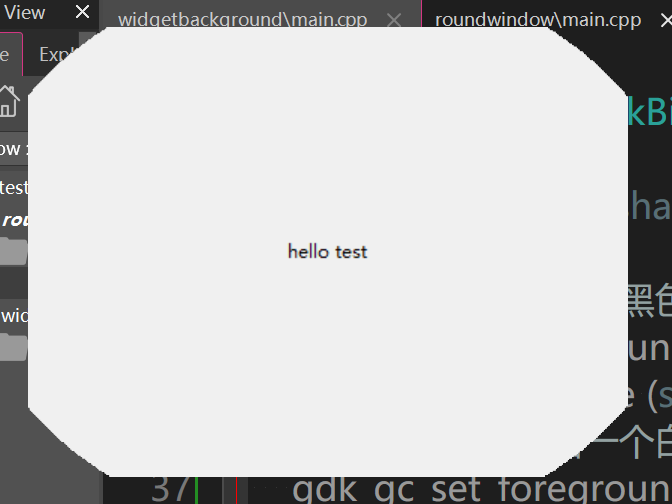
通过
我甚至还可以在窗体里挖一个洞
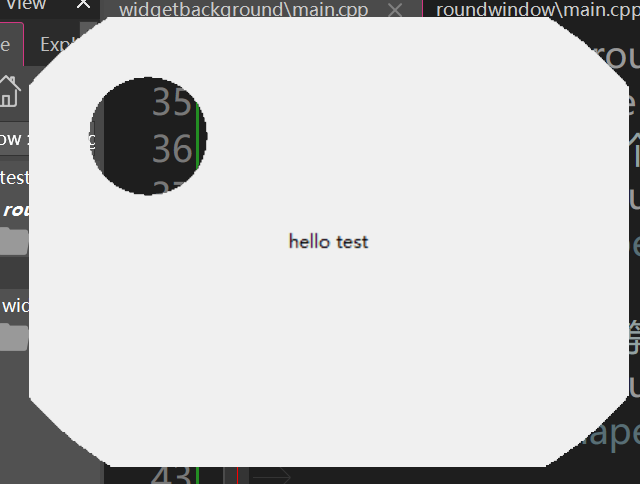
最后对于gdk_draw_arc 的解释
函数原型如下:
void gdk_draw_arc (GdkDrawable *drawable,

                   GdkGC *gc,

                   gboolean filled,

                   gint x,

                   gint y,

                   gint width,

                   gint height,

                   gint angle1,

                   gint angle2);
参数说明如下:
drawable:要绘制的绘图上下文。gc:绘图上下文,包含要应用的绘图属性,如颜色、线宽等。filled:布尔值,指示是否填充弧线。为TRUE时填充,为FALSE时只绘制弧线轮廓。x、y:弧线的左上角坐标。width、height:弧线的宽度和高度。angle1、angle2:以1/64度表示的起始角度和终止角度。0度表示水平向右,逆时针方向增加角度。
使用gdk_draw_arc函数,可以在给定的绘图上下文中绘制椭圆形或圆弧形。可以通过设置filled参数为TRUE来填充弧线,或设置为FALSE来只绘制轮廓。
请注意,该函数已经在GTK+ 3中被废弃,建议使用Cairo库进行绘图操作。