The official website of rclone:https://rclone.org/
rclone's GitHub address:https://github.com/rclone/rclone
Both the client and the server need to use rclone, and the operating system for both is Windows. After downloading, just unzip and use it.
To start the WebDAV service on the server, you only need to open the CMD and enter one command.
rclone.exe serve webdav F:\sharedDir --addr :8088 --user jack --pass ttt54
It means to start the webdav service, the shared directory is 'F:\sharedDir', the port is 8088, the username is jack, and the password is ttt54
The client needs to configure first, open cmd in the rclone folder and enter the following command to make a new configuration
rclone.exe config
Enter the server's IP:port step by step according to the prompts, for example 123.123.123.123:8088, along with the username and password. Then just save the configuration and exit.
2026/02/17 08:07:11 NOTICE: Config file "C:\\Users\\jack\\AppData\\Roaming\\rclone\\rclone.conf" not found - using defaults
No remotes found, make a new one?
n) New remote
s) Set configuration password
q) Quit config
n/s/q> n

Enter name for new remote.
name> mywebdav

Option Storage.
Type of storage to configure.
Choose a number from below, or type in your own value.
 1 / 1Fichier
   \ (fichier)
 2 / Akamai NetStorage
   \ (netstorage)
 3 / Alias for an existing remote
   \ (alias)
 4 / Amazon S3 Compliant Storage Providers including AWS, Alibaba, ArvanCloud, BizflyCloud, Ceph, ChinaMobile, Cloudflare, Cubbit, DigitalOcean, Dreamhost, Exaba, FileLu, FlashBlade, GCS, Hetzner, HuaweiOBS, IBMCOS, IDrive, Intercolo, IONOS, Leviia, Liara, Linode, LyveCloud, Magalu, Mega, Minio, Netease, Outscale, OVHcloud, Petabox, Qiniu, Rabata, RackCorp, Rclone, Scaleway, SeaweedFS, Selectel, Servercore, SpectraLogic, StackPath, Storj, Synology, TencentCOS, Wasabi, Zata, Other
   \ (s3)
 5 / Backblaze B2
   \ (b2)
 6 / Better checksums for other remotes
   \ (hasher)
 7 / Box
   \ (box)
 8 / Cache a remote
   \ (cache)
 9 / Citrix Sharefile
   \ (sharefile)
10 / Cloudinary
   \ (cloudinary)
11 / Combine several remotes into one
   \ (combine)
12 / Compress a remote
   \ (compress)
13 / DOI datasets
   \ (doi)
14 / Drime
   \ (drime)
15 / Dropbox
   \ (dropbox)
16 / Encrypt/Decrypt a remote
   \ (crypt)
17 / Enterprise File Fabric
   \ (filefabric)
18 / FTP
   \ (ftp)
19 / FileLu Cloud Storage
   \ (filelu)
20 / Filen
   \ (filen)
21 / Files.com
   \ (filescom)
22 / Gofile
   \ (gofile)
23 / Google Cloud Storage (this is not Google Drive)
   \ (google cloud storage)
24 / Google Drive
   \ (drive)
25 / Google Photos
   \ (google photos)
26 / HTTP
   \ (http)
27 / Hadoop distributed file system
   \ (hdfs)
28 / HiDrive
   \ (hidrive)
29 / ImageKit.io
   \ (imagekit)
30 / In memory object storage system.
   \ (memory)
31 / Internet Archive
   \ (internetarchive)
32 / Internxt Drive
   \ (internxt)
33 / Jottacloud
   \ (jottacloud)
34 / Koofr, Digi Storage and other Koofr-compatible storage providers
   \ (koofr)
35 / Linkbox
   \ (linkbox)
36 / Local Disk
   \ (local)
37 / Mail.ru Cloud
   \ (mailru)
38 / Mega
   \ (mega)
39 / Microsoft Azure Blob Storage
   \ (azureblob)
40 / Microsoft Azure Files
   \ (azurefiles)
41 / Microsoft OneDrive
   \ (onedrive)
42 / OpenDrive
   \ (opendrive)
43 / OpenStack Swift (Rackspace Cloud Files, Blomp Cloud Storage, Memset Memstore, OVH)
   \ (swift)
44 / Oracle Cloud Infrastructure Object Storage
   \ (oracleobjectstorage)
45 / Pcloud
   \ (pcloud)
46 / PikPak
   \ (pikpak)
47 / Pixeldrain Filesystem
   \ (pixeldrain)
48 / Proton Drive
   \ (protondrive)
49 / Put.io
   \ (putio)
50 / QingCloud Object Storage
   \ (qingstor)
51 / Quatrix by Maytech
   \ (quatrix)
52 / Read archives
   \ (archive)
53 / SMB / CIFS
   \ (smb)
54 / SSH/SFTP
   \ (sftp)
55 / Shade FS
   \ (shade)
56 / Sia Decentralized Cloud
   \ (sia)
57 / Storj Decentralized Cloud Storage
   \ (storj)
58 / Sugarsync
   \ (sugarsync)
59 / Transparently chunk/split large files
   \ (chunker)
60 / Uloz.to
   \ (ulozto)
61 / Union merges the contents of several upstream fs
   \ (union)
62 / WebDAV
   \ (webdav)
63 / Yandex Disk
   \ (yandex)
64 / Zoho
   \ (zoho)
65 / iCloud Drive
   \ (iclouddrive)
66 / premiumize.me
   \ (premiumizeme)
67 / seafile
   \ (seafile)
Storage> 62

Option url.
URL of http host to connect to.
E.g. https://example.com.
Enter a value.
url> 123.123.123.123:8088

Option vendor.
Name of the WebDAV site/service/software you are using.
Choose a number from below, or type in your own value.
Press Enter to leave empty.
 1 / Fastmail Files
   \ (fastmail)
 2 / Nextcloud
   \ (nextcloud)
 3 / Owncloud 10 PHP based WebDAV server
   \ (owncloud)
 4 / ownCloud Infinite Scale
   \ (infinitescale)
 5 / Sharepoint Online, authenticated by Microsoft account
   \ (sharepoint)
 6 / Sharepoint with NTLM authentication, usually self-hosted or on-premises
   \ (sharepoint-ntlm)
 7 / rclone WebDAV server to serve a remote over HTTP via the WebDAV protocol
   \ (rclone)
 8 / Other site/service or software
   \ (other)
vendor> 8

Option user.
User name.
In case NTLM authentication is used, the username should be in the format 'Domain\User'.
Enter a value. Press Enter to leave empty.
user> jack

Option pass.
Password.
Choose an alternative below. Press Enter for the default (n).
y) Yes, type in my own password
g) Generate random password
n) No, leave this optional password blank (default)
y/g/n> y
Enter the password:
password:
Confirm the password:
password:

Option bearer_token.
Bearer token instead of user/pass (e.g. a Macaroon).
Enter a value. Press Enter to leave empty.
bearer_token>

Edit advanced config?
y) Yes
n) No (default)
y/n>

Configuration complete.
Options:
- type: webdav
- url: 123.123.123.123:8088
- vendor: other
- user: jack
- pass: *** ENCRYPTED ***
Keep this "mywebdav" remote?
y) Yes this is OK (default)
e) Edit this remote
d) Delete this remote
y/e/d> y

Current remotes:

Name                 Type
====                 ====
mywebdav             webdav

e) Edit existing remote
n) New remote
d) Delete remote
r) Rename remote
c) Copy remote
s) Set configuration password
q) Quit config
e/n/d/r/c/s/q> q
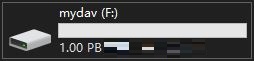
Then enter the command again to mount the remote WebDAV as a local drive
rclone.exe mount mywebdav: F:
mywebdav is the configuration name set during the previous configuration, and F is the drive letter of the hard disk you want to mount. You'll notice a new disk 'F:' on your computer, and opening it will show the WebDAV directory shared by the remote server. You can use it as a local disk in any other program.