I wrote a simple Win32 form program and compiled and ran it using MinGW for testing.
#ifndef UNICODE
#define UNICODE
#endif

#include <windows.h>
#include <commctrl.h>   // Required for the progress bar control

// Global instance handle
HINSTANCE hInst;

// Control ID Definition
#define IDC_BUTTON_START    1001
#define IDC_PROGRESS        1002

// Function Declaration
LRESULT CALLBACK WndProc(HWND, UINT, WPARAM, LPARAM);

// Program entry point
int WINAPI WinMain(HINSTANCE hInstance, HINSTANCE hPrevInstance, LPSTR lpCmdLine, int nCmdShow) {
    // Store instance handle
    hInst = hInstance;

    // Initialize the common control library (needed for the progress bar)
    INITCOMMONCONTROLSEX icc = { sizeof(INITCOMMONCONTROLSEX), ICC_PROGRESS_CLASS| ICC_BAR_CLASSES };
    InitCommonControlsEx(&icc);

    // Register window class
    const WCHAR CLASS_NAME[] = L"SampleAppWindow";

    WNDCLASSW wc = { };
    wc.lpfnWndProc   = WndProc;
    wc.hInstance     = hInstance;
    wc.lpszClassName = CLASS_NAME;
    wc.hbrBackground = (HBRUSH)(COLOR_WINDOW + 1);
    wc.hCursor       = LoadCursorW(NULL, IDC_ARROW);

    if (!RegisterClassW(&wc)) {
        return 0;
    }

    // Create Window
    HWND hwnd = CreateWindowExW(
        0,
        CLASS_NAME,
        L"Simple Win32 Program",
        WS_OVERLAPPEDWINDOW & ~WS_MAXIMIZEBOX & ~WS_THICKFRAME,
        CW_USEDEFAULT, CW_USEDEFAULT, 400, 200,
        NULL,
        NULL,
        hInstance,
        NULL
    );

    if (!hwnd) {
        return 0;
    }

    ShowWindow(hwnd, nCmdShow);
    UpdateWindow(hwnd);

    // Message Loop
    MSG msg;
    while (GetMessageW(&msg, NULL, 0, 0)) {
        TranslateMessage(&msg);
        DispatchMessageW(&msg);
    }

    return 0;
}

// Window Proc
LRESULT CALLBACK WndProc(HWND hwnd, UINT uMsg, WPARAM wParam, LPARAM lParam) {
    switch (uMsg) {
    case WM_CREATE: {
        // Create Button
        HWND hButton = CreateWindowW(
            L"BUTTON",
            L"Start",
            WS_TABSTOP | WS_VISIBLE | WS_CHILD | BS_DEFPUSHBUTTON,
            50, 30, 100, 30,
            hwnd,
            (HMENU)IDC_BUTTON_START,
            hInst,
            NULL
        );

        // Creating a Progress Bar
        HWND hProgress = CreateWindowW(
            PROGRESS_CLASSW,
            NULL,
            WS_CHILD | WS_VISIBLE,
            50, 80, 280, 25,
            hwnd,
            (HMENU)IDC_PROGRESS,
            hInst,
            NULL
        );

        // Set progress bar range (0-100)
        SendMessageW(hProgress, PBM_SETRANGE, 0, MAKELPARAM(0, 100));
        // Set progress to 33%
        SendMessageW(hProgress, PBM_SETPOS, 33, 0);
        break;
    }

    case WM_COMMAND: {
        int wmId = LOWORD(wParam);
        // Handle button click
        if (wmId == IDC_BUTTON_START) {
            MessageBoxW(hwnd, L"Button clicked!", L"Info", MB_OK | MB_ICONINFORMATION);
        }
        break;
    }

    case WM_DESTROY: {
        PostQuitMessage(0);
        return 0;
    }
    }

    return DefWindowProcW(hwnd, uMsg, wParam, lParam);
}
To compile and run, you need to add linking parameters -lcomctl32
g++ t.cpp -lcomctl32
./a.exe
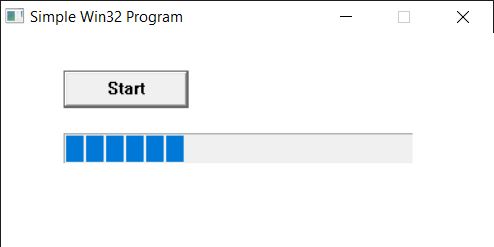
It displays an old Windows 95-style visual theme. How can i make it use modern visual style controls?
First, you need to make sure common controls are initialized.
INITCOMMONCONTROLSEX icc;
// Initialise common controls.
icc.dwSize = sizeof(icc);
icc.dwICC = ICC_WIN95_CLASSES;
InitCommonControlsEx(&icc);
I registered the progress bar control and the button control in the example, and there is no problem.
// Initialize the common control library (needed for the progress bar)
INITCOMMONCONTROLSEX icc = { sizeof(INITCOMMONCONTROLSEX), ICC_PROGRESS_CLASS| ICC_BAR_CLASSES };
InitCommonControlsEx(&icc);
This table shows the meanings of different control flags, which come from:https://learn.microsoft.com/en-us/windows/win32/api/commctrl/ns-commctrl-initcommoncontrolsex?redirectedfrom=MSDN
| Value | Meaning |
|---|---|
| ICC_ANIMATE_CLASS 0x00000080 | Load animate control class. |
| ICC_BAR_CLASSES 0x00000004 | Load toolbar, status bar, trackbar, and tooltip control classes. |
| ICC_COOL_CLASSES 0x00000400 | Load rebar control class. |
| ICC_DATE_CLASSES 0x00000100 | Load date and time picker control class. |
| ICC_HOTKEY_CLASS 0x00000040 | Load hot key control class. |
| ICC_INTERNET_CLASSES 0x00000800 | Load IP address class. |
| ICC_LINK_CLASS 0x00008000 | Load a hyperlink control class. |
| ICC_LISTVIEW_CLASSES 0x00000001 | Load list-view and header control classes. |
| ICC_NATIVEFNTCTL_CLASS 0x00002000 | Load a native font control class. |
| ICC_PAGESCROLLER_CLASS 0x00001000 | Load pager control class. |
| ICC_PROGRESS_CLASS 0x00000020 | Load progress bar control class. |
| ICC_STANDARD_CLASSES 0x00004000 | Load one of the intrinsic User32 control classes. The user controls include button, edit, static, listbox, combobox, and scroll bar. |
| ICC_TAB_CLASSES 0x00000008 | Load tab and tooltip control classes. |
| ICC_TREEVIEW_CLASSES 0x00000002 | Load tree-view and tooltip control classes. |
| ICC_UPDOWN_CLASS 0x00000010 | Load up-down control class. |
| ICC_USEREX_CLASSES 0x00000200 | Load ComboBoxEx class. |
| ICC_WIN95_CLASSES 0x000000FF | Load animate control, header, hot key, list-view, progress bar, status bar, tab, tooltip, toolbar, trackbar, tree-view, and up-down control classes. |
I need to create a file named "[application name].exe.manifest" in the same directory as the program. For example, if my program is a.exe, I should create a file called a.exe.manifest. Then edit the following content.
<?xml version="1.0" encoding="utf-8" standalone="yes"?>

<assembly xmlns="urn:schemas-microsoft-com:asm.v1" manifestVersion="1.0">
  <compatibility xmlns="urn:schemas-microsoft-com:compatibility.v1">
    <application>
      <!-- Supports Windows Vista / Server 2008 -->
      <supportedOS Id="{e2011457-1546-43c5-a5fe-008deee3d3f0}"/>
      <!-- Supports Windows 7 / Server 2008 R2 -->
      <supportedOS Id="{35138b9a-5d96-4fbd-8e2d-a2440225f93a}"/>
      <!-- Supports Windows 8 / Server 2012 -->
      <supportedOS Id="{4a2f28e3-53b9-4441-ba9c-d69d4a4a6e38}"/>
      <!-- Supports Windows 8.1 / Server 2012 R2 -->
      <supportedOS Id="{1f676c76-80e1-4239-95bb-83d0f6d0da78}"/>
      <!-- Supports Windows 10 -->
      <supportedOS Id="{8e0f7a12-bfb3-4fe8-b9a5-48fd50a15a9a}"/>
    </application>
  </compatibility>
  <trustInfo xmlns="urn:schemas-microsoft-com:asm.v3">
    <security>
      <requestedPrivileges>
        <requestedExecutionLevel level="asInvoker" uiAccess="false"/>
      </requestedPrivileges>
    </security>
  </trustInfo>
  <dependency>
    <dependentAssembly>
      <assemblyIdentity type="Win32" name="Microsoft.Windows.Common-Controls" version="6.0.0.0" processorArchitecture="*" publicKeyToken="6595b64144ccf1df" language="*"/>
    </dependentAssembly>
  </dependency>
</assembly>
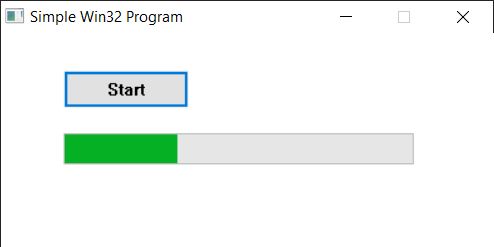
Then recompile and run, and you can get modern-style controls.
I referred to this address:https://www.transmissionzero.co.uk/computing/win32-apps-with-mingw/
If you don't want the program directory to include a manifest file with the same name, you can also compile the manifest file into the program. The method is:
Create a test.manifest file. Enter the same content as the previous manifest file. This is the manifest file that needs to be embedded in the program.
Create a resource.rc file. Enter the following content, specifying the path to the test.manifest file.
#include <windows.h>

//if not include windows.h
//#define RT_MANIFEST 24

#define CREATEPROCESS_MANIFEST_RESOURCE_ID 1
CREATEPROCESS_MANIFEST_RESOURCE_ID RT_MANIFEST "test.manifest"
The Windows operating system automatically looks for a resource of type RT_MANIFEST with ID 1 when loading a program to use as the application's default manifest. Therefore, no other changes are needed.
Use windres to compile resource.rc to generate an object file
windres resource.rc -o resource.o
Use gcc to compile the program and generate an object file
g++ -c t.cpp
Last link
g++ -o a.exe t.o resource.o -lcomctl32
Programs generated this way can display modern-style controls, and they do not require a external manifest file at runtime.