GTK natively uses UTF-8 encoded characters. I made sure that the program code files are UTF-8 encoded. The strings used in them are also in UTF-8 format, but when I use GTK to display some non-English characters, such as Chinese or Japanese, it shows garbled text.
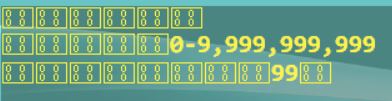
This confused me at first. I found that other controls could display these texts normally. I realized that it was because I had set a different font for this control in CSS. The font I set was Consolas, which may not support the display of non-English characters, causing garbled text.
I need to set its font to one that supports multiple languages, for example
.random-generate-textview {
    background-color: rgba(22,22,12,0.2);
    color:#FFF43D;
    font: Monospace 15;
    font-weight: bold;
}
This way, non-English text can be displayed normally.