System information
============================================
Operating System:windows 10 1909
mingw:gcc version 7.3.0 (i686-posix-dwarf-rev0, Built by MinGW-W64 project)
msys2:MSYS_NT-10.0-18363 DESKTOP-A5I7M70 3.3.6-341.x86_64 2022-10-24 08:25 UTC x86_64 Msys
libgpg-error:1.48
libgcrypt:1.10.3
============================================
First, download the msys2 installer from the msys2 official website:https://www.msys2.org/
I installed msys2 on C:\msys64
I did not directly install MinGW inside msys2; I installed and used the local MinGW-W64 32-bit version. Official website:https://www.mingw-w64.org/

Start msys2. Since I have not installed mingw and make and various compilation tools inside msys2, I need msys2 to inherit the system variables to use the local mingw compilation tools. The method is to find msys2_shell.cmd in the msys2 installation directory, edit it, and uncomment the line to inherit environment variables.
set MSYS2_PATH_TYPE=inherit
Then click msys2_shell.cmd to open msys2. If entering gcc -v can display the version information, that's fine.
Download the source code of libgcrypt and Libgpg-error:https://www.gnupg.org/software/libgcrypt/index.html

Compile libgpg-error
Compiling the libgcrypt library requires the support of the libgpg-error library, so libgpg-error needs to be compiled first.
At first, I downloaded version 1.34 of libgpg-error, extracted it, then entered the directory in MSYS2 and ran configure directly. The --host=i686-w32-mingw32 specifies the 32-bit MinGW build environment. If it's 64-bit, you need to change it to --host=x86_64-w64-mingw32. The --prefix=/install specifies the installation directory afterwards, and the / root directory is the installation directory of MSYS2.
cd /C/Users/jack/Downloads/libgpg-error-1.34.tar/libgpg-error-1.34
./configure --host=i686-w32-mingw32 --prefix=/install --enable-static --enable-shared
After the configuration was completed, I started compiling and got an error.
mingw32-make
...
make  all-recursive
process_begin: CreateProcess(NULL, make all-recursive, ...) failed.
make (e=2): The system cannot find the file specified.
mingw32-make: *** [Makefile:441: all] Error 2
The reason is that the make.exe I am using is mingw's own mingw32-make.exe, and during the make process it calls make.exe. MSYS2 reports an error when it cannot find this program. The solution is to create a make.exe symbolic link pointing to mingw32-make.exe.
$ which mingw32-make
/d/BuildTools/i686-7.3.0-release-posix-dwarf-rt_v5-rev0/mingw32/bin/mingw32-make

ln -s /d/BuildTools/i686-7.3.0-release-posix-dwarf-rt_v5-rev0/mingw32/bin/mingw32-make.exe /usr/bin/make.exe
Then compile later, and an error occurs midway
gawk: fatal: cannot use gawk builtin `namespace' as variable name
Because this version of the source code libgpg-error-1.34 is too old and incompatible with gawk, I downloaded a new version, libgpg-error-1.48. I repeated the compilation steps and encountered some error warnings below, but they did not affect the results. The compilation did not exit either.
libtool:   error: Could not determine the host path corresponding to
libtool:   error:   '/c/Users/jack/Downloads/libgpg-error-1.48.tar/libgpg-error-1.48/src/.libs'
libtool:   error: Continuing, but uninstalled executables may not work.
libtool:   error: Could not determine the host path corresponding to
libtool:   error:   '/c/Users/jack/Downloads/libgpg-error-1.48.tar/libgpg-error-1.48/src/.libs:/inst
all/lib:/install/bin'
Explanation here:https://www.gnu.org/software/libtool/manual/html_node/File-Name-Conversion-Failure.html
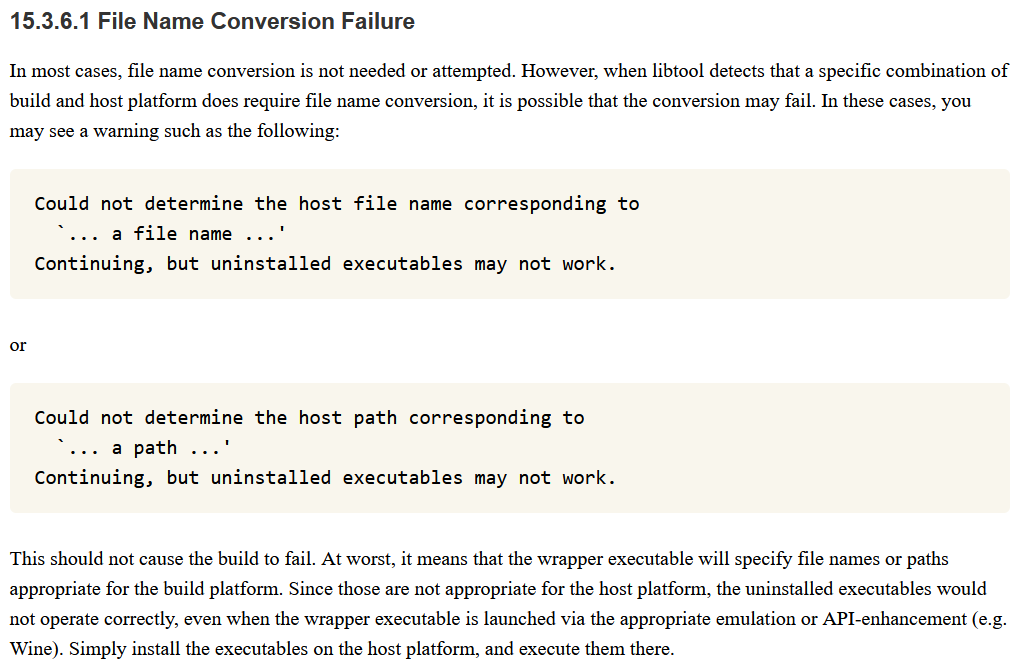
Later, it got stuck here for a few minutes again. But in the end, it was able to get through.
Confirm gpg-error-config works...

Confirm gpg-error-config works... good
Finally install it, the gpg-error library was installed in the C:\msys64\install directory
make install
Directory Structure
├─bin
│      gpg-error.exe
│      gpgrt-config
│      libgpg-error-0.dll
│      yat2m.exe
│
├─include
│      gpg-error.h
│      gpgrt.h
│
├─lib
│  │  libgpg-error.a
│  │  libgpg-error.dll.a
│  │  libgpg-error.la
│  │
│  └─pkgconfig
│          gpg-error.pc
│
└─share
    ├─aclocal
    │      gpg-error.m4
    │      gpgrt.m4
    │
    ├─common-lisp
    │  └─source
    │      └─gpg-error
    │              gpg-error-codes.lisp
    │              gpg-error-package.lisp
    │              gpg-error.asd
    │              gpg-error.lisp
    │
    ├─info
    │      dir
    │      gpgrt.info
    │
    ├─libgpg-error
    │      errorref.txt
    │
    ├─locale
    │  ├─cs
    │  │  └─LC_MESSAGES
    │  │          libgpg-error.mo
    │  │
    │  ├─da
    │  │  └─LC_MESSAGES
    │  │          libgpg-error.mo
    │  │
    │  ├─de
    │  │  └─LC_MESSAGES
    │  │          libgpg-error.mo
    │  │
    │  ├─eo
    │  │  └─LC_MESSAGES
    │  │          libgpg-error.mo
    │  │
    │  ├─es
    │  │  └─LC_MESSAGES
    │  │          libgpg-error.mo
    │  │
    │  ├─fr
    │  │  └─LC_MESSAGES
    │  │          libgpg-error.mo
    │  │
    │  ├─hu
    │  │  └─LC_MESSAGES
    │  │          libgpg-error.mo
    │  │
    │  ├─it
    │  │  └─LC_MESSAGES
    │  │          libgpg-error.mo
    │  │
    │  ├─ja
    │  │  └─LC_MESSAGES
    │  │          libgpg-error.mo
    │  │
    │  ├─nl
    │  │  └─LC_MESSAGES
    │  │          libgpg-error.mo
    │  │
    │  ├─pl
    │  │  └─LC_MESSAGES
    │  │          libgpg-error.mo
    │  │
    │  ├─pt
    │  │  └─LC_MESSAGES
    │  │          libgpg-error.mo
    │  │
    │  ├─ro
    │  │  └─LC_MESSAGES
    │  │          libgpg-error.mo
    │  │
    │  ├─ru
    │  │  └─LC_MESSAGES
    │  │          libgpg-error.mo
    │  │
    │  ├─sr
    │  │  └─LC_MESSAGES
    │  │          libgpg-error.mo
    │  │
    │  ├─sv
    │  │  └─LC_MESSAGES
    │  │          libgpg-error.mo
    │  │
    │  ├─tr
    │  │  └─LC_MESSAGES
    │  │          libgpg-error.mo
    │  │
    │  ├─uk
    │  │  └─LC_MESSAGES
    │  │          libgpg-error.mo
    │  │
    │  ├─vi
    │  │  └─LC_MESSAGES
    │  │          libgpg-error.mo
    │  │
    │  ├─zh_CN
    │  │  └─LC_MESSAGES
    │  │          libgpg-error.mo
    │  │
    │  └─zh_TW
    │      └─LC_MESSAGES
    │              libgpg-error.mo
    │
    └─man
        └─man1
                gpgrt-config.1
Compile libgcrypt
I downloaded the libgcrypt-1.10.3 version, extracted it, entered the corresponding directory in msys2, and then configured it, specifying --with-libgpg-error-prefix=/install to indicate the location of the previously installed libgpg-error library, so that it can find it.
./configure --host=i686-w32-mingw32 --prefix=/install/libgcrypt-1.10.3 --enable-static --enable-shared --disable-asm --disable-doc --with-libgpg-error-prefix=/install
However, exiting here afterward still prompts that libgpg-error cannot be found.
checking for gpg-error-config... /install/bin/gpg-error-config
checking for GPG Error - version >= 1.27... no
configure: error: libgpg-error is needed.
                See ftp://ftp.gnupg.org/gcrypt/libgpg-error/ .
It is looking for the gpg-error-config script, but this is the libgpg-error library for Windows, which does not have the gpg-error-config script. You can see that it does not have this file by checking the bin directory of gpg-error.
Later, I asked the AI and set the environment variables so that the pkg-config tool could find the gpg-error library.
export PKG_CONFIG_PATH=/install/lib/pkgconfig:$PKG_CONFIG_PATH
Then add parameters to make it specify using gpg-error.exe and gpgrt-config
./configure --host=i686-w32-mingw32 --prefix=/install-libgcrypt --enable-static --enable-shared --disable-asm --disable-doc --with-libgpg-error-prefix=/install GPG_ERROR_CONFIG=/install/bin/gpg-error.exe GPGRT_CONFIG=/install/bin/gpgrt-config
Afterwards the configuration went through, and gpg-error was found.
checking for gpg-error-config... /install/bin/gpg-error.exe
checking for gpgrt-config... /install/bin/gpgrt-config
configure: Use gpgrt-config with /install/lib as gpg-error-config
checking for GPG Error - version >= 1.27... yes (1.48)
Then use make to compile, and an error occurs midway
gcc -DHAVE_CONFIG_H -I. -I..  -I../src -I../src  -I/install/include -g -O2 -fno-delete-null-pointer-
checks -Wall -MT testdrv.o -MD -MP -MF .deps/testdrv.Tpo -c -o testdrv.o testdrv.c
testdrv.c:35:10: fatal error: gpg-error.h: No such file or directory
 #include <gpg-error.h> /* For some macros.  */
          ^~~~~~~~~~~~~
compilation terminated.
make[2]: *** [Makefile:915: testdrv.o] Error 1
This is a strange problem. Even though the correct compilation parameters were added and the location of the gpg-error library header file directory was specified, it still prompts that the gpg-error.h header file cannot be found.
Later, using the pkg-config tool to verify the header file directory, it was found to be in Windows directory format.
$ pkg-config --cflags --libs gpg-error
-IC:/msys64/install/include -LC:/msys64/install/lib -lgpg-error
Just rerun the configuration script. Additional compile and link parameters were specified. Make them use Windows directory format.
$./configure --host=i686-w32-mingw32 --prefix=/install-libgcrypt --enable-static --enable-shared --disable-asm --disable-doc --with-libgpg-error-prefix=/install GPG_ERROR_CONFIG=/install/bin/gpg-error.exe GPGRT_CONFIG=/install/bin/gpgrt-config CPPFLAGS="-IC:/msys64/install/include" LDFLAGS="-LC:/msys64/install/lib"
Then recompile and install
make
make install
The compilation and installation were successful. I guess my local mingw32 is not msys-mingw, so it can't find paths like /. Here is the directory structure.
├─bin
│      dumpsexp.exe
│      hmac256.exe
│      libgcrypt-20.dll
│      libgcrypt-config
│      mpicalc.exe
│
├─include
│      gcrypt.h
│
├─lib
│  │  libgcrypt.a
│  │  libgcrypt.def
│  │  libgcrypt.dll.a
│  │  libgcrypt.la
│  │
│  └─pkgconfig
│          libgcrypt.pc
│
└─share
    └─aclocal
            libgcrypt.m4