A Simple Introduction to Hash Algorithms
A hash algorithm is a mathematical function that can compress data of any length (such as files or text) into a fixed-length string (called a hash value). This process is one-way, meaning it is impossible to derive the original data from the hash value, and any slight change in the original data will cause a significant change in the hash value.
Its core uses include two aspects: first, integrity verification, which is used to check whether files or data have been accidentally corrupted or maliciously tampered with during transmission or storage; second, rapid comparison, which determines whether the contents of two files are the same by comparing their hash values, commonly used in scenarios such as password storage, data deduplication, and digital signatures.
According to security strength, common algorithms are divided into three categories: unsafe MD5 and SHA-1 (suitable only for detecting random errors); the currently most widely used secure standard, the SHA-2 family (such as SHA-256); and the new generation standard, SHA-3. In addition, there are CRC and xxHash for high-speed checks, which are fast but cannot prevent malicious tampering.
Methods for performing hash verification on files in Windows systems
The Windows system can use the built-in certutil tool to calculate file hashes. Its command is as follows
certutil -hashfile "path/to/file" [Algorithm]
List of supported hash algorithms
| Algorithm | Parameter value |
|---|---|
| MD2 | MD2 |
| MD4 | MD4 |
| MD5 | MD5 |
| SHA-1 | SHA1 |
| SHA-256 | SHA256 |
| SHA-384 | SHA384 |
| SHA-512 | SHA512 |
For example, calculate the sha-256 value of the file C:\Downloads\example.iso
certutil -hashfile "C:\Downloads\example.iso" SHA256

SHA256 hash of C:\Downloads\example.iso:
a9cb4f3b0794d9b0be3e4ba9714f22b71d6ebd25fcceee11cd5e5fef7957395b
CertUtil: -hashfile command completed successfully.
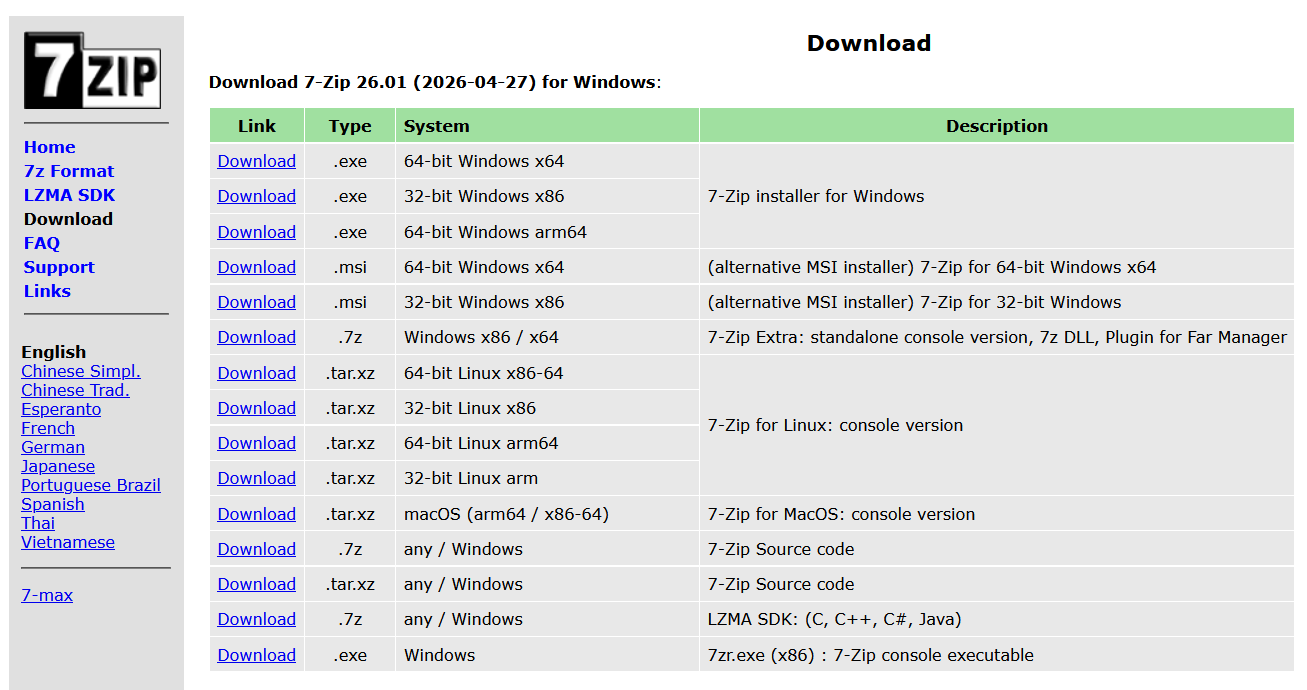
In addition to certutil, Windows systems can also install 7-zip to calculate file hashes. 7-zip is a file compression/decompression tool, and its official download address is: https://7-zip.org/download.html
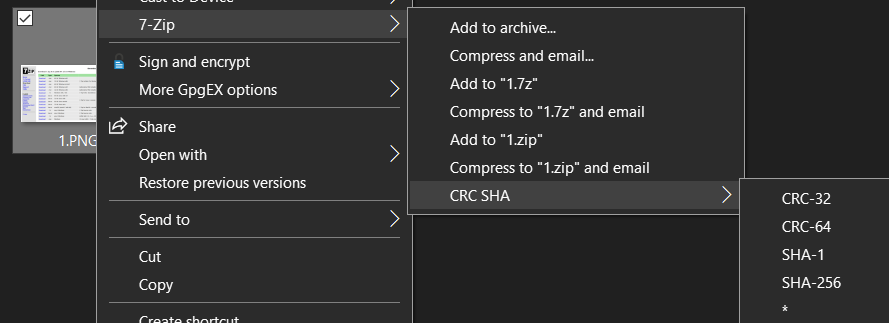
After installation, right-click on the file. You will find an option for hash verification. You can quickly calculate the file's SHA-1 and SHA-256 values.
Methods for performing hash verification on files in a Linux system
Hash verification of files in the Linux system is quite simple, and usually the system's built-in command tools can accomplish these functions.
Calculate the MD5 value of a file
[liveuser@localhost ~]$ md5sum ~/1.txt

5c9597f3c8245907ea71a89d9d39d08e  /home/liveuser/1.txt
Calculate the SHA1 value of a file
[liveuser@localhost ~]$ sha1sum ~/1.txt

972a1a11f19934401291cc99117ec614933374ce  /home/liveuser/1.txt
Calculate the SHA224 value of a file
[liveuser@localhost ~]$ sha224sum ~/1.txt

3b0bd467ec4bda98ef7c45081afa03864d3bc2b4483ca5746b09f07b  /home/liveuser/1.txt
Calculate the SHA256 value of a file
[liveuser@localhost ~]$ sha256sum ~/1.txt

17e682f060b5f8e47ea04c5c4855908b0a5ad612022260fe50e11ecb0cc0ab76  /home/liveuser/1.txt
Calculate the SHA384 value of a file
[liveuser@localhost ~]$ sha384sum ~/1.txt

dabda38953bfe9076cb84b328e3bc2d4f748fd0426a8fb01df3e5a9327645a6ae5e585dc9feb1f7bacb77d07df92a2c4  /home/liveuser/1.txt
Calculate the SHA512 value of a file
[liveuser@localhost ~]$ sha512sum ~/1.txt

77e52614a141cef19a76de6193e9c845b8cffffecf4973653e5d7a5d121450fab6142890e0f794715722ba4257ee28cb0f4e3966f18e11c9e62fa6babf0a748f  /home/liveuser/1.txt